

Knee pain at work · meeting comfort · safer sitting
How to Sit Through Meetings With Knee Pain
Without Making It Worse
A long meeting can turn a sore knee into a tiny courtroom under the desk. You try to look professional, listen carefully, and not make a whole performance out of shifting your leg, while your knee quietly files complaints with every passing agenda item.
This guide is for the ordinary, awkward middle: not an emergency, not nothing, just the kind of knee pain that makes office chairs, conference tables, classrooms, Zoom calls, and training days feel longer than they should. The goal is not to diagnose your knee. It is to help you sit, stand, adjust, and speak up with more intelligence and less grimacing.
You will learn how to set up your chair before the meeting starts, change position before pain spikes, use simple tools without overbuying, recognize warning signs, and ask for small accommodations without delivering your entire medical autobiography in the chat box.
Reduce fixed-angle stress
Use chair height, foot support, and small shifts to keep your knee from being trapped in one position.
Move without awkwardness
Quiet under-desk resets and camera-friendly standing breaks help you stay present.
Know when to stop optimizing
Some symptoms deserve medical care, not another ergonomic experiment.
The quiet promise: one better meeting setup today can save your knee from becoming the loudest person in the room. 🪑
Snapshot
This article is for office workers, remote employees, managers, students, caregivers, and frequent meeting attendees whose knees ache during long sitting. It helps you adjust your chair, plan small movement breaks, compare simple comfort tools, avoid common mistakes, and decide when knee pain should be checked by a medical professional instead of managed with desk tricks.
Table of Contents

Before You Sit Through Another Meeting: Safety Comes First
Knee pain during meetings is common enough to feel boring, but it is not always harmless. A knee can ache because it has been bent too long, because an old injury is irritated, because arthritis is flaring, or because something needs a proper exam. The trick is knowing when comfort tactics are reasonable and when they become a little too brave.
This article can help you make sitting less punishing. It cannot tell you why your knee hurts, whether you need imaging, whether you should exercise through pain, or whether a medication is safe for you. For those questions, a clinician, physical therapist, pharmacist, or orthopedic specialist is the right human on the bridge.
Before you act:
Use the advice here as comfort planning, not diagnosis. If your knee is swollen, hot, red, locked, unstable, visibly deformed, severely painful after an injury, or unable to bear weight, stop trying to “meeting hack” the problem and seek medical care. If pain is recurring, worsening, or changing, document it and ask a qualified professional what is appropriate for your situation.
Red flags before another long meeting
Some knee symptoms deserve attention before your next two-hour planning session. Watch for swelling that appears quickly, redness or warmth around the joint, fever with knee swelling, a knee that gives way, locking that prevents normal bending or straightening, or severe pain after a fall, twist, collision, or awkward step.
The phrase “I can still walk” can be misleading. Many people can walk on an irritated or injured knee for a while, especially when adrenaline, habit, or workplace pressure is steering the bus. Ability to walk does not automatically mean everything is fine.
- Call or seek care promptly if your knee cannot bear weight, looks deformed, or pain follows a significant injury.
- Ask for medical advice if swelling, redness, warmth, fever, locking, or instability shows up.
- Track patterns if pain keeps returning after sitting, stairs, driving, exercise, or workdays.
What this guide can and cannot do
This guide can help you reduce avoidable sitting stress. It can show you how to change knee angle, avoid twisting, plan standing breaks, compare desk tools, and talk to a manager without feeling dramatic.
It cannot replace an exam, diagnose arthritis or ligament injury, tell you whether pain medicine is safe, or decide whether you need physical therapy, imaging, injections, surgery, or time off. Comfort tactics are useful, but they are not a lab coat.
Why Meetings Make Knees Angry: The Fixed-Angle Problem
The knee is not offended by professionalism. It is offended by being folded into one angle for too long.
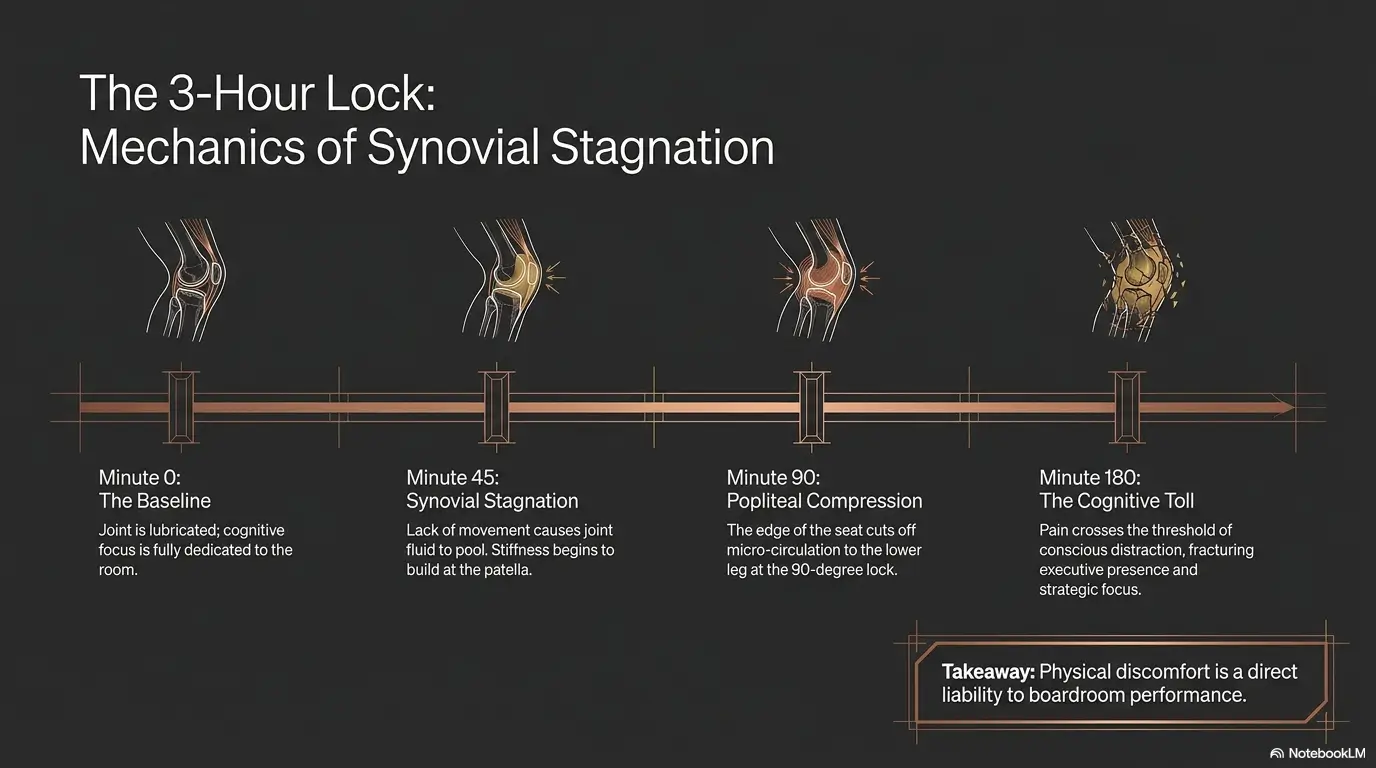
Many meeting chairs hold the hips and knees near a right angle. That position is not automatically bad, but it can become irritating when it stays unchanged for 30, 60, or 120 minutes. Add a low chair, dangling feet, crossed legs, or a laptop balanced at a strange height, and the knee may start tapping its invisible spoon against the glass.
Fixed angles create stiffness
When the knee stays bent, tissues around the joint do not get much variety. Muscles, tendons, ligaments, joint surfaces, and irritated areas may all prefer gentle changes in position. Sitting perfectly still can feel polite to the room but rude to your body.
That does not mean every sore knee needs constant movement. It means many meeting-related aches respond better to planned small changes than to heroic stillness.
Meeting length changes the pain math
A 15-minute check-in may be fine. A 90-minute strategy call, then lunch sitting, then another training block can stack into a full day of knee compression and stiffness. Pain often becomes easier to prevent than to calm once it has climbed the staircase.
Think of meeting comfort as a timing game. The best move is not waiting until pain becomes loud. The best move is changing position while discomfort is still whispering.
The hidden villain is usually not posture alone
Posture matters, but “sit up straight” is too small an answer. Knee pain during meetings usually involves several ingredients: chair height, knee bend, foot support, meeting length, stress, prior activity, old injuries, footwear, and how long you wait before moving.
Key takeaway:
The goal is not a perfect sitting position. The goal is a meeting plan that gives your knee variety before pain becomes the main agenda item.
Short Story: The Budget Meeting That Needed a Chair
Marcus had a recurring Thursday budget meeting, the kind with twelve tabs open, three people saying “just to clarify,” and one knee that began aching at minute twenty-two.
For weeks, he blamed the meeting. Then he noticed the real pattern. He sat in a low guest chair, tucked one foot under him, and refused to stand because he did not want to seem distracted.
The fix was unglamorous. He raised his chair, put a thick book under one foot, placed a note on his agenda that said “shift at topic change,” and typed in chat before the call, “I may stand briefly for knee comfort, still here.”
The meeting did not become exciting. Let us not insult reality. But his knee stopped turning every budget review into a tiny hostage negotiation. The lesson was simple: sometimes the first treatment is not toughness. It is setup.
The Pre-Meeting Chair Setup That Buys You Time
The best time to protect your knee is before the meeting begins. Once people are screen-sharing, debating calendar dates, and asking where the spreadsheet went, your attention gets spent elsewhere. A 60-second setup can save you from 60 minutes of quiet bargaining with your kneecap.
Raise the seat so the knee is not over-folded
A chair that is too low can force the knees into a deeper bend. Try setting the seat so your hips are roughly level with, or slightly higher than, your knees. Your feet should still be supported. If your feet dangle, the chair is too high for that setup unless you add a footrest.
This is especially relevant for shorter workers in tall office chairs, students using fixed lecture seats, and remote employees using dining chairs that were chosen for dinner, not anatomy.
Give your feet something solid
Unsupported feet can make the legs feel tense and restless. A small footrest, backpack, yoga block, sturdy box, or book stack can help you vary your knee angle. The goal is not to lock both feet into one “correct” position. The goal is to create options.
- Place one foot flat on the floor and one on a low support for a few minutes.
- Switch sides during natural breaks in the agenda.
- Try both feet on the support if it reduces knee bend without creating hip or back strain.
- Avoid high supports that push the knees sharply upward.
Avoid the under-chair knee twist
Tucking one foot under the chair can feel comfortable for five minutes and suspicious by minute forty. It may twist the knee, load one side unevenly, and make standing up harder. Crossed legs can do something similar, especially when the top leg pulls the knee inward or outward.
Try a simple rule: if your foot position would make it awkward to stand quickly, it probably should not be your default meeting position.
The chair test before you join
Before the meeting starts, sit down, place both feet, and stand once. If standing requires a dramatic little opera, the setup needs editing. Raise the chair, change foot support, move closer to the edge, or choose a different seat if one is available.
| Setup check | What it may mean | Try this first |
|---|---|---|
| Knees are much higher than hips | Seat may be too low or too deep | Raise chair or sit on a firm cushion if safe |
| Feet dangle | Seat may be too high | Use a footrest, book stack, or lower chair |
| You tuck one foot back | Knee may be twisting under the chair | Keep feet forward and supported |
| Standing feels stiff or painful | Position may be too fixed for too long | Plan earlier micro-movement breaks |
For a deeper work-from-home setup angle, you may also find this related guide useful: office chair height after hip surgery. Even though the focus is different, the practical chair-height thinking overlaps with safer sitting.
How to Move During a Meeting Without Looking Distracted
People often sit still because they are afraid movement will look rude. Yet pain can make you far less present than a brief position change ever would. The goal is not fidgeting. The goal is quiet, planned movement that keeps you able to listen.
Use the agenda as a movement timer
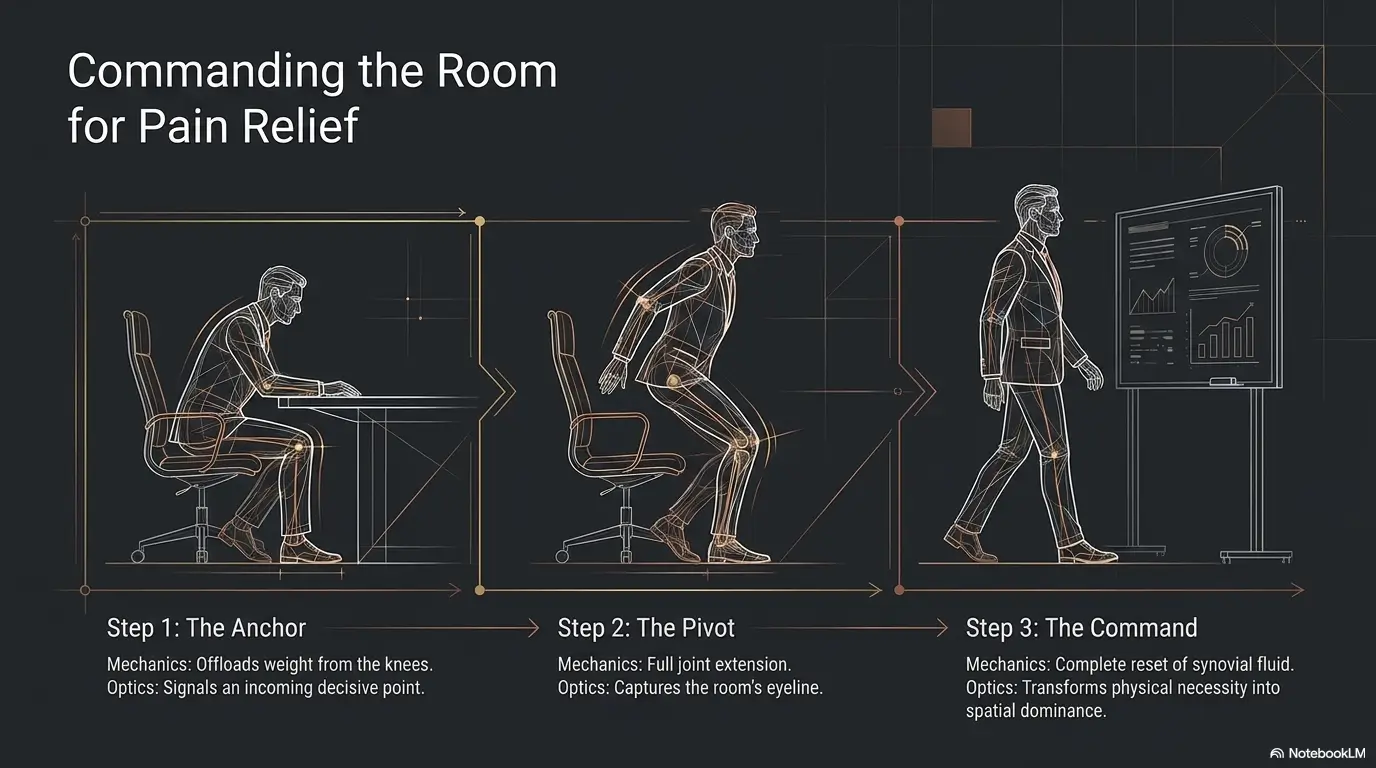
Instead of watching the clock, tie movement to meeting structure. Shift your feet when the agenda changes. Straighten your knee gently when a new speaker begins. Stand briefly after a screen share ends. These cues are less annoying than alarms and easier to remember.
- At the start: feet flat, knee angle comfortable, posture relaxed.
- After the first agenda item: move one foot to a low support.
- At the midpoint: straighten the sore knee gently under the desk if space allows.
- Before the final topic: stand briefly or reset both feet.
Choose camera-friendly movements
On video calls, movement feels more visible than it usually is. Most knee-friendly adjustments happen below the desk line. You can slide one foot forward, change foot support, gently extend the leg, or sit slightly closer to the chair edge without turning the call into performance art.
If you need to stand, say it plainly. “I’m going to stand for a minute for knee comfort, still listening” is enough. No apology monologue required.
Write one line before the meeting
If you are worried about seeming restless, use a simple chat message before the meeting begins. This works well for remote employees, students in online classes, and people who report to managers who value context.
Copy-and-use meeting note:
“Just a heads-up: I may stand or shift briefly during the meeting because of knee pain. I’m fully present and following along.”
Do not wait for the knee to shout
Waiting until pain is intense makes every movement feel like a rescue mission. Earlier changes are smaller, calmer, and less noticeable. If you know your knee usually starts aching around minute thirty, move at minute twenty.
This is the small mercy of prevention: it asks less from you than recovery.
Common Meeting Mistakes That Make Knee Pain Worse
The most expensive knee mistakes at work are often free. They are habits, not devices. The good news is that habits can be changed without ordering half the internet.
Mistake 1: Sitting perfectly still to look professional
Stillness can look composed, but it may make stiffness worse. A person in pain may become quieter, less engaged, and more distracted. That is not professionalism. That is endurance wearing a blazer.
Safer alternative: make small changes early and predictably. Shift when speakers change. Stand during listening-only portions. Use a footrest rather than locking your knee in one bend.
Mistake 2: Crossing, tucking, and twisting
Crossing your legs or tucking one foot under the chair can twist the knee while the rest of your body faces forward. The position may feel cozy at first, then suddenly become a bad idea with witnesses.
Safer alternative: keep the knee pointed roughly the same direction as the foot and hip. You do not need military symmetry. You do need less corkscrew energy under the table.
Mistake 3: Using painkillers as a meeting strategy
Medication may be appropriate for some people, but it should not be the only plan for surviving ordinary meetings. Over-the-counter pain medicines can have risks, interactions, and dosing limits. Ask a clinician or pharmacist if you are unsure, especially if you have other medical conditions or take other medications.
Safer alternative: combine any approved medication plan with setup changes, movement, and tracking. If you need medicine repeatedly just to tolerate sitting, that is worth discussing with a professional.
Mistake 4: Buying before observing
A premium chair can still be wrong for your body. A fancy footrest can still sit unused under the desk, gathering dust like a tiny ergonomic monument. Before spending money, observe the exact pattern.
- Does pain start after a specific meeting length?
- Does it worsen when the chair is low?
- Does standing help or aggravate it?
- Does crossing your legs trigger it?
- Does pain show up with swelling, locking, or instability?
A simple log can help. This pain flare trigger log is a useful companion if your knee pain keeps returning after specific activities, workdays, or sitting blocks.
Key takeaway:
Do not buy your way out of a pattern you have not identified. Watch the chair, knee angle, meeting length, and pain timing first.
Meeting Formats That Protect Knees Without Slowing Work
Knee-friendly meetings are not only a personal responsibility. Managers, team leads, instructors, and organizers can design meetings that let people move without making comfort feel like a special request.
This matters for older workers, people recovering from procedures, employees with arthritis, students with injuries, and anyone whose body does not thrive inside a rigid 60-minute block. A humane meeting is not softer. It is usually sharper.
Make 50 minutes the new 60
A default 50-minute meeting gives people time to stand, refill water, use the restroom, walk to another room, or reset before the next call. It also forces cleaner agendas. The last ten minutes of many meetings are not wisdom. They are fog with calendar invites.
Turn status updates into async notes
If the meeting is mostly reporting, an async update may protect knees, backs, calendars, and morale. Use live meetings for decisions, tradeoffs, conflict, coaching, and questions that actually need discussion.
For remote teams, this can also reduce the pressure to sit camera-on for long stretches. A short written update may do the job with less physical cost.
Normalize standing without making it weird
A manager can set the tone in one sentence: “Feel free to stand, stretch, or turn camera off briefly if you need to stay comfortable.” That small permission can prevent people from treating pain like a private character test.
| Meeting type | Knee-friendly change | Why it helps |
|---|---|---|
| Weekly status meeting | Send updates first, meet only for blockers | Cuts unnecessary sitting time |
| Training session | Add scheduled two-minute standing breaks | Prevents stiffness before it spikes |
| One-on-one | Offer walking or standing call option | Makes movement normal, not exceptional |
| Decision meeting | Use 50-minute default with agenda limits | Keeps focus high and sitting time lower |
If you are returning to work after a procedure or helping someone plan a safer workday, this related guide on remote work after surgery may help you think through calls, breaks, and communication expectations.
Desk Tools and Budget Options: What Is Worth Trying First
There is a whole marketplace eager to sell comfort in padded, adjustable, memory-foamed, medically flavored packaging. Some tools help. Some simply make your office look as if a physical therapy catalog exploded politely.
The best way to choose knee pain meeting tools is to start cheap, observe honestly, and upgrade only when the basic fix solves the right problem.
Start with angle, not gadgets
Before buying anything, test whether changing knee angle helps. Use a backpack as a footrest. Try a firm cushion if your chair is too low. Move your chair closer to the table so your feet are not pulled back. If those changes help, you have better information about what a purchased tool should do.
Good, Better, Best meeting comfort setup
| Setup tier | Best for | What to try | Before you pay |
|---|---|---|---|
| Good | Budget-conscious workers and students | Book stack, backpack footrest, agenda-based movement cue | Confirm that changing knee angle actually helps |
| Better | Daily desk workers with recurring meeting pain | Adjustable footrest, chair height adjustment, soft standing mat | Check return policy and whether it fits your desk height |
| Best | People with long workdays or formal accommodation needs | Adjustable chair, sit-stand option, documented meeting break plan | Ask whether a clinician or employer needs to document the need |
What to compare before buying
If you are shopping for a chair, footrest, standing mat, or cushion, compare fit before features. The fanciest option is useless if it does not match your height, desk, meeting habits, and pain pattern.
- Height range: Can the chair place your hips slightly above your knees while your feet are supported?
- Foot support: Does the footrest allow more than one comfortable position?
- Return policy: Can you test it during real meetings?
- Storage: Will it fit under your desk or become clutter?
- Stability: Is it safe when you stand, shift, or reposition?
- Cleaning: Can it handle coffee, dust, shoes, and real office life?
Heat, cold, and simple comfort timing
Some people prefer warmth before sitting because it reduces stiffness. Others prefer cold after activity or swelling. The right choice can depend on the cause of pain, timing, medical conditions, skin sensitivity, and clinician guidance.
Do not use heat or cold in a way that numbs skin, burns, causes discomfort, or substitutes for care when red flags are present. For a practical comparison, see this related guide on heating pad vs ice wrap.
Show me the nerdy details
A meeting can bother a sore knee because it combines joint angle, time under low movement, muscle guarding, circulation changes, and attention fatigue. The knee does not need to be “compressed flat” to feel irritated. Even a moderate bend can become annoying when held too long.
This is why the same chair may feel fine for email but terrible during a long video call. Email invites natural movement: you stand, reach, turn, refill coffee, or check a file. Meetings often freeze you into a listening pose. The solution is to reintroduce movement without wrecking the social rules of the meeting.
If pain is related to arthritis, swelling, tendon irritation, recent injury, or surgery recovery, the best position may vary. That is why a log and professional advice matter when symptoms persist or change.
The Two-Minute Reset for Long Meetings, Conferences, and Classes
The two-minute reset is not exercise. It is a tiny pressure valve. It works because it is short enough to fit real life and clear enough to repeat when your brain is full.
Use it between calls, during a break, after a long agenda item, or whenever your knee begins to feel stiff but before pain becomes sharp or intense.
The basic two-minute knee reset
Two-minute reset checklist:
- Stand up slowly and place both feet securely.
- Take two relaxed breaths before moving.
- Gently straighten the sore knee only within a comfortable range.
- Shift weight lightly from one foot to the other if it feels safe.
- Sit back down with feet supported and the knee angle slightly changed.
Do not force deep bends, aggressive stretches, or “testing” movements during a meeting break. If a movement causes sharp pain, locking, giving way, dizziness, or unusual symptoms, stop and seek appropriate advice.
Conference and training-day version
Conferences and long classes are harder because you may not control the chair, agenda, or room layout. Arrive early when possible. Choose an aisle seat if you expect to stand. Keep a small bag available as a foot position option. Use restroom breaks strategically, not only when urgent.
If you are attending an all-day session, do not save every movement break for lunch. That is too late. A knee that has been bargaining since breakfast may not forgive you just because the sandwiches are wrapped nicely.
Classroom and student version
Students may feel awkward standing in class, especially in lecture halls. If knee pain is recurring, a brief conversation with the instructor, disability services office, or school health resource may help. The request can be simple: an aisle seat, permission to stand briefly, or a seating option that does not trap the knee in a deep bend.
The earlier the arrangement is made, the less it feels like an interruption.
Meeting Knee Comfort Framework
1
Screen first
Swelling, locking, fever, severe injury pain, or instability means comfort tips are not enough.
2
Set the chair
Raise low seats, support feet, and avoid tucking or twisting under the table.
3
Move early
Use agenda changes, speaker changes, and screen-share pauses as quiet movement cues.
4
Document patterns
Recurring pain deserves notes, better questions, and possibly professional evaluation.
When to Get Medical Help Instead of Optimizing the Chair
There is a moment when the chair is no longer the main character. If pain keeps returning, worsens, or comes with warning signs, more ergonomic tinkering can become a maze. The way out is documentation and professional guidance.
Symptoms that should not be worked around
Seek appropriate medical advice if your knee is swollen, hot, red, feverish, unstable, locked, visibly deformed, severely painful after injury, or unable to bear weight. Also ask for help if knee pain is interfering with work, sleep, stairs, driving, exercise, or basic daily movement.
Medical care is not failure. It is information. And information beats guessing in circles.
What to document before an appointment
A useful knee pain note does not need poetry. It needs patterns. Bring clear, practical information to a clinician so the visit does not depend on memory under fluorescent lights.
- When the pain started and whether an injury happened.
- Where the pain is: front, inside, outside, back, under kneecap, or hard to locate.
- What makes it worse: sitting, stairs, standing, walking, squatting, driving, or exercise.
- What helps: rest, position change, heat, cold, medication, brace, or movement.
- Any swelling, locking, clicking, giving way, redness, warmth, numbness, or fever.
- How pain affects work, sleep, meetings, commuting, caregiving, or daily tasks.
If you want a structured visit prep page, this orthopedic visit checklist can help you organize symptoms, questions, insurance details, and next-step notes.
Questions to ask a provider
If you see a doctor, physical therapist, or orthopedic clinician, ask questions that connect medical advice to your actual workday. “My knee hurts” is true. “My knee hurts after 35 minutes of sitting in meetings and improves when I stand for two minutes” is more useful.
Provider question checklist:
- Are there movements or positions I should avoid during long meetings?
- How often should I stand or change position during desk work?
- Would physical therapy be appropriate for my symptoms?
- Should I use heat, cold, a brace, or medication, and when should I avoid them?
- Do my symptoms suggest I should limit stairs, driving, exercise, or long sitting?
- What warning signs would mean I should seek urgent care?
- If work accommodations are needed, what documentation should I request?
Key takeaway:
If pain is persistent, worsening, or paired with swelling, locking, instability, fever, redness, warmth, deformity, or inability to bear weight, the next step is medical advice, not another chair adjustment.
FAQ
Why does my knee hurt more when I sit in meetings?
Long meetings often keep the knee bent in one position. That fixed angle can feed stiffness or discomfort, especially if the chair is low, your feet are unsupported, or you twist one leg under the chair. Recurring pain may also be related to arthritis, injury, swelling, tendon irritation, or other causes, so track patterns and seek advice if it persists.
Is it better to sit or stand during meetings with knee pain?
Often, the best answer is variety. Sitting the whole time may increase stiffness, while standing the whole time may bother some knees too. Try alternating positions gently. If standing causes sharp pain, buckling, dizziness, or unusual symptoms, stop and get appropriate advice.
How often should I change position during long meetings?
A practical starting point is to make a small change every 15 to 25 minutes, or at each agenda transition. If you know pain usually starts at minute thirty, shift earlier, around minute twenty. Adjust based on your symptoms and professional guidance.
What chair position is easiest on sore knees?
Many people do better when the seat is high enough that the knees are not deeply folded, while the feet remain supported. Hips roughly level with or slightly above the knees can be a useful starting point. Avoid dangling feet, sharply bent knees, and twisted leg positions.
Can crossing my legs make knee pain worse?
It can for some people, especially if crossing the legs twists the knee sideways or holds one knee in an awkward position for a long time. If your knee aches after crossed-leg sitting, use both feet supported and pointed generally forward instead.
Should I use a footrest if my knees hurt at work?
A footrest can help if it supports your feet and lets you vary knee angle. You do not need to buy one immediately. Test with a stable book stack, box, or backpack first. If that helps, compare adjustable footrests by height range, stability, return policy, and fit under your desk.
How do I ask for meeting accommodations without oversharing?
Keep it brief and work-focused. Try: “I may need to stand briefly during longer meetings because of knee pain, but I’ll stay engaged.” For formal accommodations, ask HR, your manager, student services, or the appropriate office what documentation is needed.
When should knee pain after sitting be checked by a doctor?
Consider medical advice if knee pain keeps returning, worsens, limits daily life, or comes with swelling, warmth, redness, fever, locking, buckling, deformity, severe injury-related pain, or inability to bear weight. If you are unsure, it is safer to ask than to guess.
One Meeting to Fix Today: Your 15-Minute Next Step
You do not need to redesign your entire work life today. Choose one upcoming meeting and treat it as a small experiment. Not a grand wellness project. Not a shopping trip. Just one better chair, one better foot position, and one planned movement cue.
Your 15-minute meeting fix:
- Pick the longest meeting on your calendar today or tomorrow.
- Raise or change your chair so your knees are not deeply folded.
- Place a stable foot support nearby, even if it is just a book stack.
- Write one movement cue on the agenda: “shift after topic one.”
- After the meeting, note whether pain started later, felt milder, or changed.
If the experiment helps, repeat it. If it does not help, adjust one variable at a time. If symptoms are persistent, worsening, or come with warning signs, stop treating the chair like a doctor and get proper guidance.
The aim is modest and powerful: stay in the meeting without letting the meeting take more from your knee than it needs to.
Last reviewed: 2026-07