
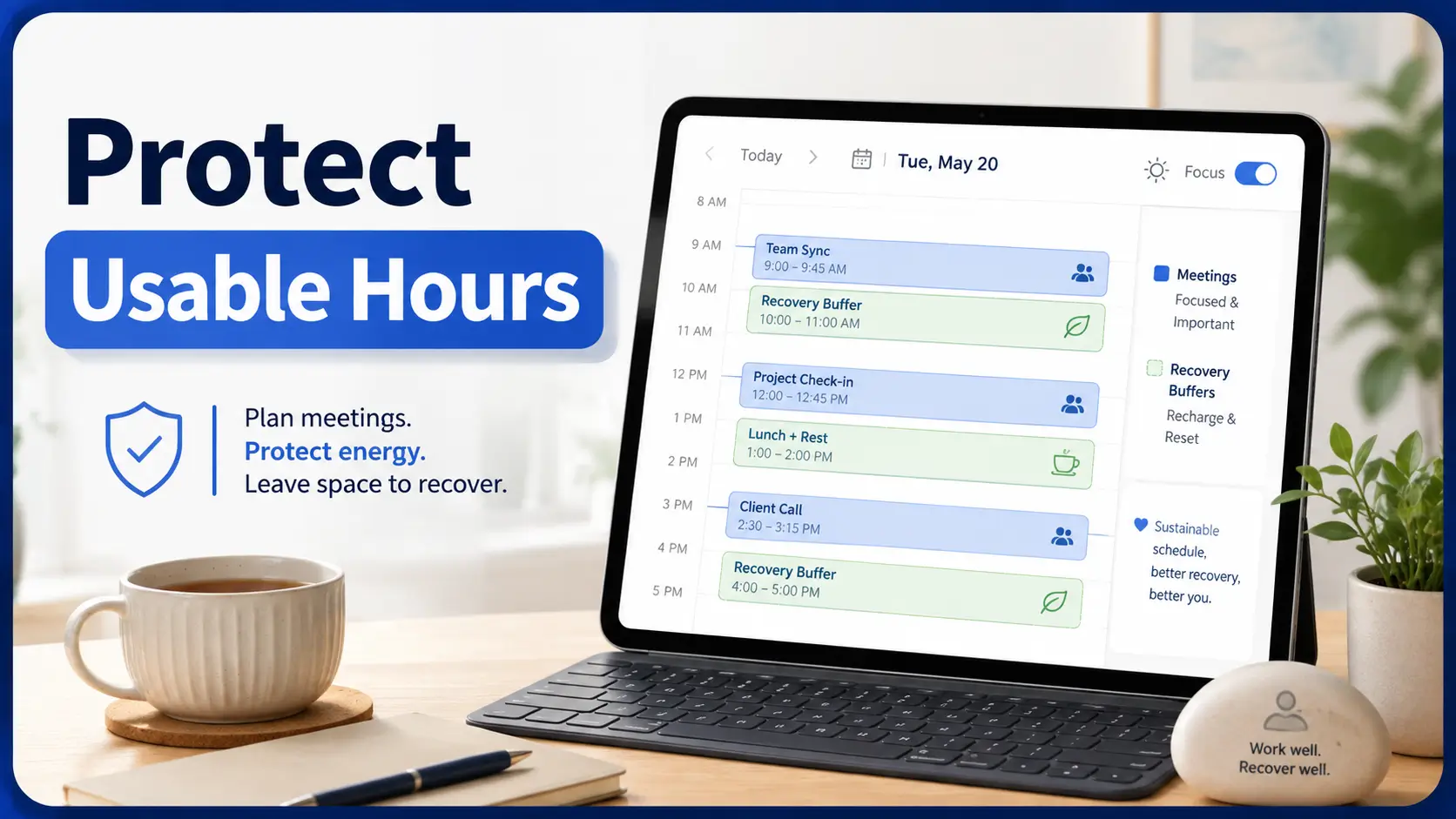
Work, Recovery & Sustainable Capacity
Best Meeting Schedule DuringPain Flare Recovery
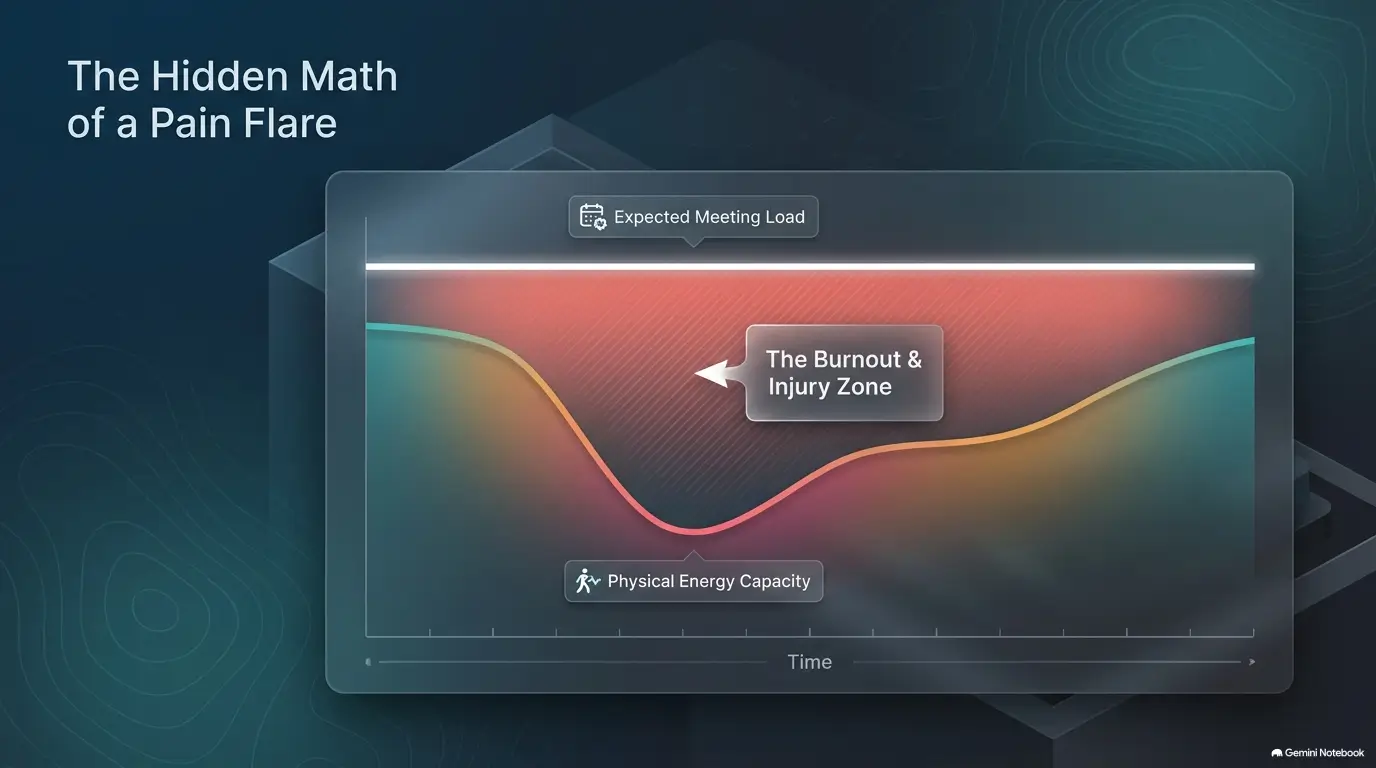
A calendar can look almost empty and still be too expensive for a recovering body. A 30-minute video call may carry a hidden price: sitting still, concentrating through discomfort, preparing beforehand, recovering afterward, and trying to sound completely normal while your attention keeps being tugged elsewhere.
That is why the best meeting schedule during pain flare recovery is rarely the one with the fewest meetings on paper. A better calendar protects the hours when you function best, separates demanding conversations, and treats recovery space as part of the workday rather than unused territory waiting to be conquered.
This guide gives you a practical framework for rebuilding your workday without pretending every flare follows the same clock. You will learn how to choose meeting windows, shorten calls, build buffers, compare scheduling tools, recognize when workplace accommodations deserve attention, and decide when an open calendar slot should remain gloriously, productively empty.
The quiet rule: your schedule should leave enough of you intact for the hours after the meeting, too. 🌿
Snapshot
This guide is for employees, freelancers, managers, and professionals working through a temporary or recurring pain flare. It helps you build a meeting schedule around functional capacity, recovery time, and work demands so you can test one safer calendar rule instead of redesigning your entire life before lunch.
Before You Act
This article offers general work-scheduling ideas, not medical advice or a personalized return-to-work plan. Pain that is severe, new, rapidly worsening, associated with new weakness or numbness, follows a significant injury, or otherwise concerns you deserves appropriate medical attention. If your clinician has given activity, medication, posture, or work restrictions, those instructions take priority over calendar optimization.

Start With Your “Usable Hours,” Not Your Normal Calendar
Most people build work calendars around availability: 9:00 is open, 10:30 is open, and there is a suspiciously pristine rectangle at 2:00 just begging for a meeting invitation.
During a pain flare, availability is the wrong first question. The better question is: when can I think, communicate, and recover with the least strain?
Find the 2–4 hours when concentration and pain are most manageable
Your best meeting window may be narrower than your normal workday. That does not necessarily mean you can only work for two or four hours. It means those may be your highest-value hours for tasks that require live interaction, judgment, persuasion, explanation, or fast decision-making.
For three to five workdays, note when you feel relatively steady. Look at pain, stiffness, fatigue, concentration, medication effects, commuting, meals, therapy appointments, sleep quality, and how long sitting or standing remains comfortable.
If your symptoms vary substantially, a simple pain flare trigger log can help you notice patterns without turning the day into a laboratory experiment.
Separate “awake” time from genuinely productive time
Being awake at 8:00 a.m. is not the same as being ready for a tense budget review at 8:00 a.m. Likewise, being able to answer email at 3:30 does not mean you have enough mental bandwidth for a client presentation.
This distinction matters especially for remote workers. Without a commute, the calendar can create the illusion that the entire span between waking and dinner is theoretically usable. It is not. A body recovering from pain does not become a 12-hour coworking space simply because the laptop is nearby.
Why yesterday’s good afternoon can mislead today’s schedule
A single easier day is encouraging, but it may not predict the next one. Recovery is often uneven. Sleep, activity, stress, appointments, travel, medication timing, and accumulated workload can change what feels manageable.
Key takeaway: Build meetings around a pattern you have observed for several days, not the most optimistic hour you have had this week.
Morning, Midday, or Afternoon? Choose the Window That Costs Least
There is no universal “best time” for meetings during a pain flare. Morning may be excellent for one person and miserable for another. The useful comparison is not morning versus afternoon in the abstract. It is which period lets you participate well without creating an oversized recovery bill afterward.
When morning meetings work better
Morning can be a good choice when your concentration is strongest after sleep, symptoms tend to build with activity, or you want important conversations completed before the day becomes physically demanding.
It may be a poor choice if stiffness is pronounced after waking, mornings include medication adjustments, your commute increases symptoms, or you need time to move, eat, shower, and settle before sustained sitting.
Why midday can become the hidden energy trap
Midday often looks ideal because you are fully awake and not yet at the end of the workday. The trap appears when a noon meeting consumes both sides of lunch, movement, medication routines, or a needed rest period.
A 12:30 call may therefore cost more than its 30 minutes suggest. If midday is normally when your body resets, consider protecting part of that window rather than filling it because everyone else happens to be free.
When late-afternoon meetings cost more than they appear to
Late meetings can be reasonable when mornings are difficult and your symptoms loosen as the day progresses. But they are worth watching carefully if pain, fatigue, or concentration problems accumulate over the day.
A 4:00 p.m. meeting that requires an hour of recovery may quietly absorb your evening. If the pattern repeats, that is useful information. The meeting may technically fit the workday while functionally spilling beyond it.
A Simple Meeting-Time Filter
A “yes, yes, no” pattern may be workable. Repeated “no, no, yes” answers suggest the time slot is cheap on the calendar and expensive everywhere else.
The 30-Minute Rule: Shorter Meetings Can Protect the Rest of Your Day
Meeting duration is one of the easiest variables to change because it does not require discovering the perfect hour of the day. If 60-minute meetings are the default in your workplace, try asking whether recurring calls can become 25 or 30 minutes.
Default 60-minute meetings to 25 or 30 minutes when possible
A shorter meeting creates two advantages. The obvious one is less time sitting, standing, concentrating, or remaining camera-ready. The less obvious benefit is that it can create a natural recovery margin before the next hour begins.
This does not mean every conversation should be compressed until colleagues sound like auctioneers. Some decisions genuinely need more time. The target is routine meetings with loose agendas, repeated status updates, or discussions that could be partly handled asynchronously.
Reserve longer calls for decisions that truly require them
If you have limited meeting capacity, spend it where synchronous conversation has the highest value: sensitive decisions, conflict resolution, complex coordination, interviews, client conversations, or discussions where rapid back-and-forth saves substantial rework.
Information delivery is different. A short written update followed by a 15-minute question period may be easier than a 45-minute status call.
Add buffer time before cognitively demanding conversations
Buffers are often treated as aftercare, but a short block before a demanding meeting can be equally valuable. It lets you stop another task, adjust your position, collect notes, refill water, use the bathroom, or simply arrive without racing the clock.
| Meeting type | Possible calendar format | Why it may help |
|---|---|---|
| Routine status | 20–25 minutes | Reduces passive meeting time and encourages a tighter agenda |
| Decision meeting | 30 minutes + 15-minute recovery block | Protects attention for the decision while preserving reset time |
| Presentation | 30–45 minutes + pre-meeting buffer | Creates preparation time without stacking another task immediately beforehand |
| Informational update | Written update + optional short call | Lets participants review information at their own pace |
Key takeaway: A 30-minute meeting plus a 15-minute buffer can be more sustainable than a 45-minute meeting followed immediately by “just one quick thing.”
Back-to-Back Meetings Are the Calendar Mistake to Fix First
If you change only one feature of your calendar, reducing back-to-back meetings is a strong candidate. Repeated calls remove the small transitions that let you shift position, breathe, get water, walk briefly, or notice that discomfort has been quietly climbing.
Why three “easy” calls can feel harder than one difficult meeting
Every meeting has a restart cost. You prepare, orient yourself, follow the conversation, respond socially, and then switch context again. Three simple calls may therefore create more cumulative load than one focused hour with a single topic.
This is particularly relevant when pain already competes for attention. The brain is being asked to monitor discomfort in the background while repeatedly reloading new names, documents, decisions, and expectations in the foreground.
Use a meeting-to-recovery ratio instead of stacking availability
You do not need a medically precise ratio. Start with an experiment. For example, after a 30-minute demanding call, protect 15 minutes. After a lighter 20-minute check-in, five or ten minutes may be enough.
The right ratio is the one that leaves you functional for the next necessary block. If 15 minutes consistently feels insufficient, that is feedback, not failure.
Do not turn calendar gaps into automatic work blocks
This is where good intentions go to get eaten by email. You create a 15-minute buffer, then fill it with messages, document edits, or a “tiny” request from a coworker. The calendar still shows a gap, but your nervous system never received the memo.
- Name the buffer something clear, such as “recovery / reset,” rather than “free.”
- Disable scheduling into that block if your calendar system allows it.
- Avoid using the entire buffer for inbox cleanup.
- Choose one simple reset activity that fits your situation and any medical guidance you have received.
- If colleagues can see your calendar, mark the block busy rather than leaving it visually open.
Show me the nerdy details
Think of a meeting as having three parts: preparation load, participation load, and recovery load. Calendar duration measures only the middle. Two 30-minute meetings can therefore have very different total costs. A familiar internal check-in might require five minutes of preparation and little recovery, while a high-stakes presentation may require substantial preparation plus a long period before your attention feels normal again. Tracking total cost for a week gives you better scheduling data than simply counting meeting hours.
Build a Pain-Flare Meeting Schedule That Breathes
A useful recovery schedule is less about creating a perfect template and more about protecting transitions. The examples below are starting points, not prescriptions.
Example schedule for a mild recovery day
| Time | Block | Purpose |
|---|---|---|
| 9:00–9:30 | Independent work | Settle in and handle focused tasks |
| 9:30–10:00 | Meeting 1 | Important conversation during a functional window |
| 10:00–10:15 | Protected reset | Move, change position, or rest as appropriate |
| 10:15–11:00 | Focused work | Use remaining strong attention for priority work |
| 11:00–11:30 | Meeting 2 | Second live conversation |
| 11:30–12:00 | Low-demand work | Notes, simple messages, or administrative tasks |
| 12:00–1:00 | Protected lunch/reset | Avoid turning lunch into a conference room |
Example schedule for a limited-capacity workday
On a more difficult day, you might designate only one or two live meeting windows, move informational updates to email, and keep the rest of the day flexible. A freelancer might reserve 10:30 and 2:00 for client calls rather than allowing booking software to expose every technically open half-hour.
An employee may have less control over timing, but can still ask whether recurring one-hour meetings can be shortened, whether camera use is necessary, or whether attendance is required for the entire call.
Example schedule when symptoms are unpredictable
When symptoms vary sharply, flexibility can matter more than finding a fixed “best” hour. Consider a primary meeting window plus a backup window later in the day, with a clear rescheduling rule for non-urgent calls.
You can also distinguish meetings into three categories: must happen today, can move within the week, and can become asynchronous. That simple sorting rule reduces the number of decisions you have to make when the flare itself is already consuming attention.
Real-world example: The calendar that looked empty
Imagine a project manager named Rachel who has only three meetings on Wednesday: 9:00, 11:00, and 2:00. On paper, the day looks generous.
But the 9:00 meeting begins before her morning stiffness settles. She spends the 10:00 hour catching up on work she could not focus on during the call. The 11:00 meeting runs long, swallowing lunch. At 2:00, she is already tired, and the client conversation needs another hour of notes and follow-up.
The fix is not necessarily fewer meetings. She moves the first call to 10:00, shortens the 11:00 update to 20 minutes, protects lunch, and keeps a 30-minute block after the client meeting.
Same three conversations. Very different day.
The useful question
Do not ask only, “Can this meeting fit?” Ask, “What has to happen before and after this meeting for the rest of the day to remain workable?”
Protect the Meeting Types That Cost the Most Energy
Meeting count is a blunt measurement. Ten minutes presenting to senior leadership may demand more from you than 40 minutes listening to a familiar team update. The schedule becomes easier to manage once you distinguish meeting intensity from meeting length.
Decision meetings versus informational meetings
Decision meetings require judgment, memory, tradeoffs, and active participation. Informational meetings often require less immediate output. If your concentration is limited, put decision-heavy calls inside your strongest window and move lower-demand updates elsewhere when possible.
Video-on meetings versus audio-only participation
Video can add useful social information, but it can also increase the sense that you must remain visually composed and relatively still. In workplaces where camera use is optional, audio-only participation may sometimes make it easier to adjust position or reduce visual fatigue.
If camera expectations are part of the difficulty, a simple request can be more useful than silently enduring it: “I may join with my camera off while I am recovering, but I will be fully available for discussion.”
Presentations, negotiations, and emotionally demanding conversations
These belong in a separate category because they often have both a preparation cost and an emotional recovery cost. Try not to place them immediately after medical appointments, commuting, physical therapy, long periods of sitting, or another high-stakes conversation if you have any scheduling control.
Which meetings can quietly become asynchronous?
- Routine status updates with no real-time decision.
- Document reviews where comments can be collected first.
- Recurring meetings that consistently end early or lack an agenda.
- Announcements that can be read rather than presented.
- Simple approvals where written context is sufficient.
For remote-work adaptations beyond meetings, the broader remote work after surgery guide may also help you think through workload, setup, and pacing.
Feeling Better Is Not the Same as Full Capacity
One of the easiest mistakes during recovery is using a good morning as evidence that the old calendar can return immediately. Relief is welcome. It is not always a reliable capacity test.
Why one good morning can trigger an overloaded afternoon
When symptoms ease, unfinished work suddenly feels possible. You accept a meeting, add another, handle the errands you postponed, and finally tackle the difficult project. By mid-afternoon, the schedule has transformed a welcome improvement into a stress test.
A more conservative approach is to treat better hours as an opportunity to do important work while preserving the same recovery structure for a few days.
Avoid scheduling tomorrow based on today’s temporary improvement
Tomorrow’s calendar should be based on your recent pattern, not today’s most encouraging hour. This is particularly useful when symptoms come and go. If communicating that variability is difficult, this guide on how to explain pain that comes and goes can help you organize the pattern more clearly.
Increase meeting volume gradually instead of restoring everything at once
Rather than jumping from two meetings a day back to six, add one variable at a time. You might first increase total meeting minutes, then test a second demanding call, then reduce one buffer if recovery remains stable.
Key takeaway: Recovery-friendly scheduling is an experiment with feedback. Add workload slowly enough that you can tell which change actually caused trouble.
When Calendar Tricks Are Not Enough
Calendar optimization has limits. If pain substantially affects your ability to perform work tasks, attend a normal schedule, remain in one position, commute, or recover between demands, the more useful conversation may involve workplace accommodations, leave, modified duties, or clinical guidance rather than another color-coded calendar.
Employees and freelancers face different scheduling problems
Freelancers often have greater control over booking windows but less protection from lost income when they reduce availability. Employees may have steadier income but less direct control over meeting culture and required attendance.
That difference changes the practical solution. A freelancer may need clearer booking rules and cancellation policies. An employee may need a conversation with a manager, HR, occupational health service, or another appropriate workplace resource.
When workplace accommodations may matter more than calendar optimization
Depending on your situation and applicable law, possible workplace adjustments might include modified scheduling, breaks, temporary remote work, changes to nonessential meeting practices, ergonomic changes, or other job-specific arrangements. What is appropriate depends on the job, the organization, your functional limitations, and local legal requirements.
For U.S. workers, the Equal Employment Opportunity Commission provides official information about reasonable accommodation under the Americans with Disabilities Act. The Job Accommodation Network also offers practical accommodation information and is funded by the U.S. Department of Labor.
Free, paid, and professional support: what is actually worth considering?
You do not need expensive software to create recovery buffers. Basic calendar blocking is enough for many people. Paid scheduling tools become more useful when clients or coworkers book directly into your calendar and you need automatic buffers, daily limits, meeting-type rules, or multiple availability windows.
| Option | Best fit | What to compare | When it may be unnecessary |
|---|---|---|---|
| Good: basic calendar blocks | Employees or freelancers with modest scheduling control | Busy status, recurring buffers, notifications | If other people regularly override your open slots |
| Better: scheduling tool with rules | Freelancers, consultants, managers, recruiters | Automatic buffers, daily meeting limits, rescheduling, privacy controls | If you only book a few meetings manually |
| Best fit for complex cases: workplace or clinical support | Persistent limitations, difficult return-to-work situations, accommodation needs | Qualifications, scope, documentation needs, fees, employer process | If a simple temporary calendar adjustment solves the problem |
Before paying for a scheduling service, check whether your existing calendar already supports appointment limits, working hours, focus blocks, automatic event shortening, or buffer settings. Paying for software to discover a feature you already own is a particularly modern form of annoyance.
The Hidden Metric: How You Feel After the Meeting
Most calendars measure what happens before a meeting: availability, conflicts, duration, participants. During recovery, one of the most useful measurements happens afterward.
Track recovery time, not just meeting duration
For one workweek, notice how long it takes before you feel ready for the next demanding task. You do not need a detailed medical diary. A quick calendar note is enough.
- Green: little noticeable effect; normal work can continue.
- Yellow: you need a meaningful reset before concentrating well again.
- Red: symptoms or fatigue interfere with the next part of the day, require substantial recovery, or repeatedly affect evening or next-day capacity.
Notice the meeting “hangover”
Sometimes the useful signal is not what happens during the meeting. You get through it adequately, then concentration falls apart 45 minutes later. Or discomfort increases after sitting longer than expected.
This delayed effect is why “I managed the meeting” is not the only success metric. A workable schedule should also leave reasonable capacity for the next necessary task.
Five common scheduling mistakes to catch early
- Putting every important meeting into your best two hours. Protect some of that window for focused work.
- Treating breaks as overflow space. A break filled with email is work wearing a tiny hat.
- Saying yes because the calendar technically looks open. Open does not mean low-cost.
- Scheduling high-stakes calls after draining appointments. Consider travel, waiting, treatment, and recovery time, not just appointment duration.
- Returning immediately to a pre-flare workload. Add capacity gradually enough to observe the effect.
A simple seven-day scorecard
| Question | Green | Yellow | Red |
|---|---|---|---|
| Could I participate adequately? | Yes, comfortably enough | Yes, with effort | Not reliably |
| How long before I could focus again? | Little or no delay | Noticeable reset needed | Substantial recovery needed |
| Did it affect later essential tasks? | No | Somewhat | Clearly |
| Did the timing feel repeatable? | Yes | Maybe | No |
If your answers keep landing in yellow or red, do not merely squeeze the meetings closer together so the misery is more efficient. Change one variable: timing, length, format, meeting type, or buffer.
Key takeaway: The best schedule is not the one that proves you can endure the most meetings. It is the one you can repeat without consistently sacrificing the rest of the day.
If recovery is changing many parts of your daily structure, not just meetings, pain changing your routine offers a broader way to think about adapting everyday tasks without assuming the change must be permanent.

FAQ: Meeting Schedules During Pain Flare Recovery
How many meetings should I schedule during a pain flare?
There is no safe universal number. Meeting tolerance depends on symptoms, meeting intensity, job demands, recovery time, and medical guidance. Start by reducing unnecessary calls, separating demanding meetings, and observing how much recovery time you actually need rather than aiming for an arbitrary daily quota.
Is it better to schedule meetings in the morning when dealing with pain?
Sometimes. Morning may work well if your concentration is strongest early or symptoms increase with activity. It may be worse if you experience substantial morning stiffness, poor sleep, a difficult commute, or medication-related changes. Use your own multi-day pattern rather than a universal morning rule.
How much time should I leave between meetings during recovery?
A practical starting experiment might be 10 to 15 minutes after routine calls and longer after demanding meetings, but your needs may be different. The useful test is whether the buffer leaves you ready for the next necessary activity without repeatedly increasing symptoms or fatigue.
Should I cancel meetings when my pain gets worse?
That depends on severity, urgency, your role, available alternatives, and any medical advice you have received. You may be able to shorten, reschedule, delegate, attend audio-only, or provide a written update. If symptoms are concerning or your clinician has advised you to stop or limit work, calendar convenience should not override that guidance.
Are shorter meetings better during chronic pain flares?
They can be, particularly if prolonged sitting, standing, concentration, or camera use increases difficulty. Shorter meetings are most useful when combined with clear agendas and protected recovery time rather than simply compressing the same amount of work into fewer minutes.
How can I tell my manager I need fewer back-to-back meetings?
Keep the request practical and work-focused. Explain the scheduling change you are asking for, such as a 15-minute buffer between longer calls or avoiding consecutive high-demand meetings, and connect it to your ability to participate effectively. If a formal accommodation may be appropriate, follow your employer’s process.
Should I keep my camera off during a pain flare?
If camera use is optional and turning it off lets you change position more comfortably or reduce visual fatigue, it may be a useful adjustment. Workplace expectations differ, so communicate clearly rather than assuming camera rules are flexible.
How quickly should I return to my normal meeting schedule?
There is no single timeline. A gradual increase can make it easier to see whether longer hours, additional calls, or reduced buffers are actually sustainable. Follow any work restrictions or return-to-work recommendations from your healthcare team.
Next Step: Change One Calendar Rule Today
You do not need a new productivity system, a complicated color palette, or a subscription that promises to organize your molecules.
Take 15 minutes and find the part of tomorrow’s workday where meetings most often begin to feel expensive. Add one protected buffer there. Fifteen minutes is enough for the experiment. Label it clearly, make it non-bookable if possible, and resist converting it into inbox time.
Then observe one thing: what does the meeting cost two hours later?
If concentration, fatigue, or post-meeting recovery improves, keep the rule for several workdays before changing anything else. If it does not help, test a different variable, such as meeting length, time of day, camera use, or asynchronous updates.
And if your symptoms are changing enough that work capacity itself is uncertain, document the pattern and bring it to the appropriate professional conversation. The orthopedic appointment notes guide can help organize questions and observations before a medical visit.
Last reviewed: 2026-09