
This site is written from a family-caregiver perspective. The operator is not a medical professional. This article provides general education and preparation prompts rather than an individual assessment.
Task access does not establish healing
Use these prompts to prepare questions and arrangements. They do not diagnose a condition, determine coverage or clear an activity.
- What to record
- The actual operation, splint or cast instructions, permitted hand use and essential computer tasks.
- What to ask
- Is typing or device use allowed now, and which alternative access method fits the prescribed plan?
- Next action and owner
- Confirm with the surgical or therapy team and agree work changes; voice input does not independently clear all other hand use. Write down who will act and when to follow up.
Keep personal records private. You can use the visit preparation organizer to arrange questions; do not post identifying health information in comments.

Recovery-safe laptop work
How to Use a Laptop After Wrist Surgery
Without Wrecking Your Recovery
A laptop looks harmless until your healing wrist meets the keyboard edge, the tiny trackpad, the “just one more email” spiral, and the sneaky swelling that arrives after the work is done. After wrist surgery, your laptop is no longer just a productivity tool. It is part workstation, part recovery test, part tiny courtroom where your hand gives evidence.
This guide is for desk workers, students, freelancers, remote employees, caregivers, and anyone trying to return to screen work after carpal tunnel release, tendon repair, fracture fixation, ganglion cyst removal, ligament repair, or another hand or wrist procedure. The goal is not to make you fearless. The goal is to make your setup boringly safe, because boring is beautiful when stitches, splints, and nerves are involved.
You will learn how to build a one-handed command center, choose useful gear without wasting money, pace work in small blocks, use dictation well, avoid incision pressure, and recognize symptoms that should be checked instead of “worked around.”
Protect the wrist
Keep typing, clicking, and scrolling inside your surgeon’s limits.
Work in smaller bites
Use short cycles before pain, swelling, or tingling becomes the boss.
Spend only where it helps
Compare low-cost, mid-range, and paid support options calmly.
Recovery rule: if the laptop makes your wrist louder, the setup is not finished yet. 🖐️
Snapshot
This article is for people returning to laptop work after wrist or hand surgery. It helps you set up your desk, reduce typing strain, compare helpful tools, avoid common recovery mistakes, and know when symptoms deserve a call to your surgeon, therapist, or care team.
Table of Contents
Before You Type: The Medical Guardrails Matter Most
This article can help you think through laptop setup, pacing, ergonomics, and work communication after wrist surgery. It cannot tell you when your specific wrist is ready for typing, gripping, lifting, or splint changes.
Your surgeon’s instructions win over any ergonomic trick. A carpal tunnel release, a distal radius fracture repair, a tendon repair, a ligament reconstruction, and a nerve procedure may all involve different restrictions. Two people can have the same scar location and completely different rules.
Use this guide as a checklist to discuss with your care team, not as permission to push past pain, numbness, swelling, wound drainage, or a tight splint. Your laptop can wait. Nerves and incisions prefer not to negotiate.
Key takeaway: laptop comfort is not the same as medical clearance.
A setup can feel clever and still be wrong for your surgery stage. Confirm restrictions on typing, lifting, gripping, brace use, wound care, driving, and therapy before you build your work plan.
Follow discharge instructions first
Discharge papers are often dull, folded, and slightly mysterious. They are also the map. Look for instructions on splint use, dressing changes, wound care, elevation, activity limits, medication timing, and warning signs.
If your instructions say to keep a splint on, do not remove it so your hand can fit the keyboard. If they say not to lift, do not carry the laptop with the surgery hand. If they say to call for worsening numbness, do not treat tingling as a productivity badge.
Know the symptoms that change the plan
Stop and contact your care team if laptop use is followed by new or worsening numbness, tingling, weakness, unusual swelling, a cool or pale hand, blue fingers, severe pain, splint pressure that feels tight, spreading redness, fever, drainage, or an incision that opens.
These symptoms do not mean something terrible is definitely happening. They mean the wrist deserves a human expert, not another tab open in your browser.
Your Laptop Is Now a Medical Tool
Before surgery, a laptop was a rectangle of deadlines, bills, school portals, browser tabs, and mild spiritual exhaustion. After surgery, it becomes a physical load. Typing, clicking, scrolling, plugging in a charger, opening the lid, carrying the device, and resting your hand near the edge all count.
That matters because “I only answered emails” can still mean hundreds of tiny finger motions, wrist stabilizing effort, forearm tension, palm pressure, and time with the hand below heart level. The danger is rarely one dramatic movement. It is the quiet accumulation.
The three permission gates: incision, swelling, and restrictions
Before using a laptop for more than a few minutes, check three gates.
- Incision gate: Is the dressing clean and dry? Are you avoiding pressure directly over the incision or scar area?
- Swelling gate: Can your fingers move comfortably? Does the splint feel normal, not tight or throbbing?
- Restriction gate: Are typing, gripping, lifting, and brace use allowed under your current post-op instructions?
If any gate is closed, the safer plan is to pause, elevate, use voice dictation, ask for help, or contact your care team. This is not laziness. This is recovery accounting.
What counts as laptop use
Laptop use is bigger than typing. It includes moving the laptop from room to room, balancing it on your lap, pinching the charger, dragging files, clicking tiny checkboxes, two-finger scrolling, using keyboard shortcuts, and holding your phone while using two-factor authentication.
For a healing wrist, these small tasks can behave like pebbles in a shoe. One is nothing. Fifty becomes a problem.
The tiny rule that saves the day: no symptom debt
Symptom debt is the cost you pay later for working too long now. You finish a document, feel heroic, then notice swelling, warmth, throbbing, or tingling one hour later. That delayed response matters.
After wrist surgery, judge laptop tolerance twice: immediately after work and again later. A task is not truly tolerated if the wrist complains after the applause.
Key takeaway: count the hidden hand tasks.
If you are trying to work one-handed, the laptop is only one piece. Phone codes, chargers, water bottles, door handles, pill bottles, and folders can overload the same healing hand.
For related home recovery problems, you may also find this guide on opening pill bottles after hand surgery useful, especially if small gripping tasks are already irritating your wrist.
Build a One-Handed Command Center
The best laptop setup after wrist surgery is not glamorous. It may involve a pillow stack, a borrowed keyboard, a box used as a laptop stand, and a water bottle with a straw. It looks a little improvised because recovery is a temporary engineering project.
Your goal is simple: keep the healing wrist neutral, supported, clean, and lightly used while the rest of your body does more of the work.
Raise the screen, lower the strain
A laptop forces a compromise. If the screen is low enough for comfortable typing, your neck bends. If the screen is high enough for your neck, the keyboard is too high. After wrist surgery, this compromise gets expensive.
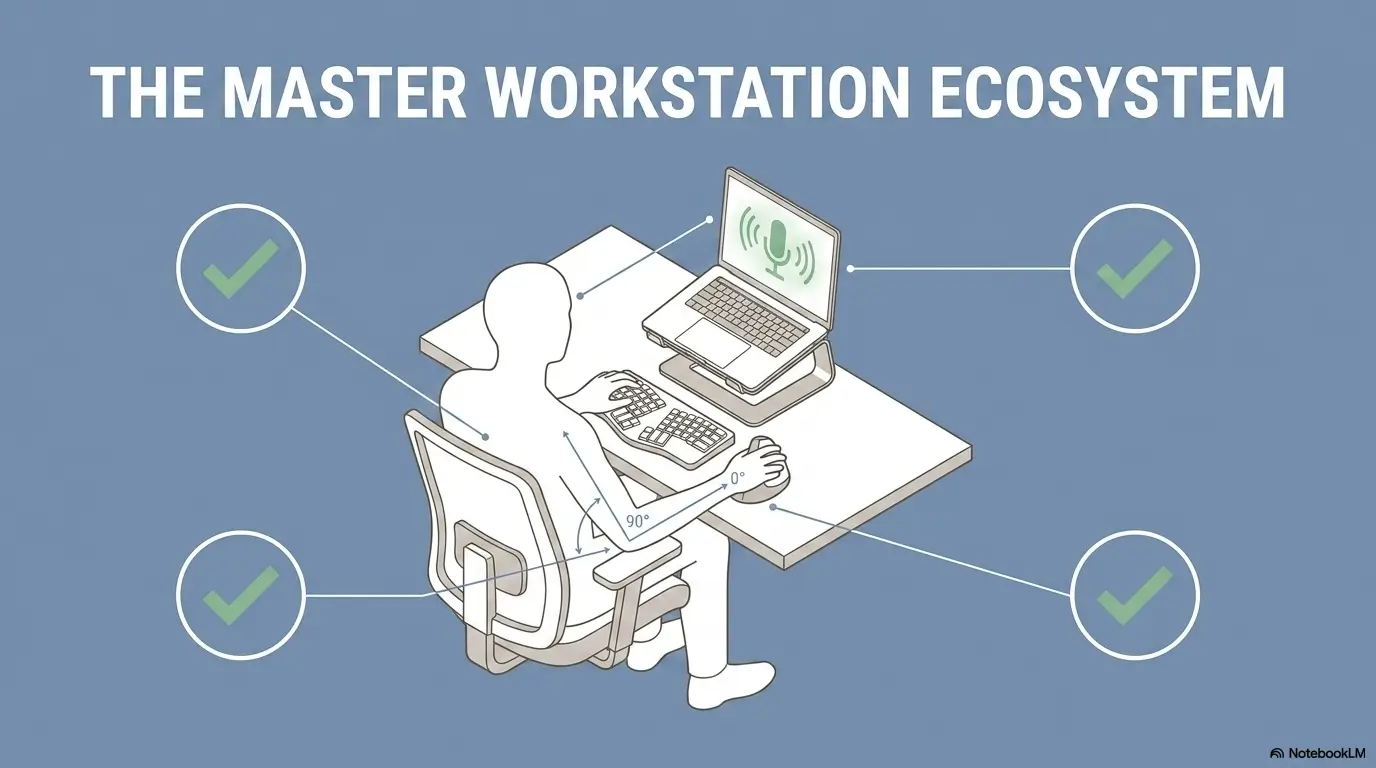
Raise the laptop screen on a stand, box, or stack of books. Then use an external keyboard and pointing device at elbow height. This separates seeing from typing, which is the whole trick.
Keep the healing hand off the laptop edge
The front lip of a laptop can press into the palm, incision area, or tender scar tissue. Even if the pressure feels minor at first, it can become irritating over a work block.
Use a separate keyboard placed slightly away from the desk edge. Support the forearm on a soft surface if your care team allows it, but avoid resting directly on the incision. The point is support, not compression.
Put everything on the safe side
Set up the items you reach for most often on the non-surgery side: water, phone, charger, notebook, remote, tissues, medications, and glasses. The fewer cross-body reaches you make, the less your healing wrist gets volunteered for tiny jobs.
For shoulder or arm restrictions, the same principle applies. This related guide on a shoulder sling typing setup may help if your wrist surgery is part of a larger upper-limb recovery plan.
The Recovery-Safe Laptop Setup Flow
1
Lift the screen
Bring the display up so your neck does not drag your shoulders forward.
2
Separate the keys
Use an external keyboard so the wrist is not trapped by the laptop lip.
3
Support lightly
Support the forearm without pressing the incision, splint, or palm.
4
Stop on signals
Swelling, warmth, tingling, or color change means the work block is over.

Neutral Wrist Position: The Small Angle With Big Consequences
Neutral wrist position means the wrist is not bent up, bent down, or angled sideways. Imagine your hand and forearm making one calm line rather than a little ramp, hook, or curve.
Neutral does not mean stiff. A stiff wrist can create its own tension. Think “quiet and supported,” not “frozen museum hand.”
What neutral feels like on a keyboard
When the keyboard is at the right height, your shoulders are relaxed, elbows are near your sides, forearms are roughly level, and your fingers can touch the keys without your wrist lifting or collapsing.
If your shoulders rise, your keyboard may be too high. If your wrist bends backward, the keyboard may be too far away, too thick, or tilted the wrong direction. If your palm is planted hard on the desk, you may be using the surface as a brace instead of support.
Why laptop keyboards can be a trap
Laptop keyboards are shallow and close to the screen. The trackpad sits directly under the palms. The front edge invites pressure. The small layout makes some people curl their fingers and hover their wrists, which can be exhausting after surgery.
This is why an external keyboard is often the cheapest useful upgrade. You are not buying luxury. You are buying space.
Do not chase perfect posture
Perfect posture is a fragile statue. Repeatable comfort is better. Your ideal setup may change between week one, week three, and month three as swelling, strength, scars, and therapy goals change.
Make one adjustment at a time. Try it for a short work block. Then check symptoms immediately and later. That is more useful than buying every ergonomic device on the internet at 1:07 a.m.
Show me the nerdy details
Keyboard work can increase hand and forearm demand when the wrist is held in awkward extension, flexion, or side-bending. The practical takeaway is not that one keyboard style magically fixes recovery. It is that height, distance, slope, forearm support, key force, mouse placement, and session length all interact.
After surgery, the safest plan is usually to reduce total load: fewer keystrokes, lighter touch, more dictation, shorter work blocks, less trackpad use, and no pressure over the incision or splint. The right setup should make the hand feel less involved, not merely better decorated.
When in doubt, ask your hand therapist or surgeon to review your workstation photo. A 30-second photo can reveal problems that your wrist has been politely complaining about all afternoon.
Voice Dictation First: Let Your Mouth Carry the Load
Dictation is not just for novelists, executives, or people dramatically pacing beside a window. After wrist surgery, it can be the bridge between doing nothing and doing too much.
Use speech-to-text for first drafts, emails, search queries, text messages, meeting notes, task lists, and rough outlines. Your hand can edit lightly later, or someone else can clean up the text if accuracy matters.
Draft by voice, edit by hand lightly
Most people assume writing is the painful part. Often, editing is worse. Editing requires small, precise movements: highlight this, delete that, click there, drag the cursor, fix one comma, repeat until your wrist files a complaint.
Try this workflow: dictate a messy draft, take a break, then do one short cleanup pass. For work emails, use templates. For school assignments, dictate section notes first. For freelancers, create reusable client update snippets.
Use canned replies before fatigue
Set up three to five canned responses while your hand is fresh or with help from someone else. A few examples:
- “Thanks, I’m recovering from wrist surgery and will respond in a shorter format this week.”
- “Could you send this as a bulleted list so I can review it more easily?”
- “I can join the meeting, but I may use voice notes instead of live typing.”
- “I’m available for review tasks, but I’m limiting typing blocks during recovery.”
These replies reduce decision fatigue. They also keep you from typing a custom apology letter every time someone wants a paragraph.
Keyboard shortcuts reduce mouse travel
Shortcuts can help, but only if they do not create awkward finger reaches. Choose the few that remove the most clicking: copy, paste, undo, save, search, switch tabs, send later, mute, and open dictation.
Do not try to become a shortcut wizard during recovery. Your wrist is healing, not auditioning for a productivity circus.
Key takeaway: dictation is not cheating.
Use your voice for volume and your hand for tiny finishing touches. The less your healing wrist has to produce, the more it can recover.
The 10-Minute Work Cycle: Type Less, Recover More
Long laptop sessions are risky because pain often arrives late. You may feel fine during the first hour, then spend the evening wondering why your hand feels hot, swollen, or irritable.
Ten minutes is only an organizational example, not a proven safe starting dose of computer work. Ask your care team which hand tasks are allowed, for how long, and how to progress. Their shorter or stricter limit takes priority even when the wrist feels comfortable.
The basic cycle
For an ordinary permitted task, set a timer within the limit your team gave you, which may be shorter than ten minutes. Stop sooner for symptoms. Keep the prescribed splint and support; do not add a typing trial solely to check whether the repair tolerates it.
Then rest. Elevate if instructed. Use the non-surgery hand for water, phone, or notes. Check again about an hour later. Your delayed response tells you whether the next session should stay the same, shrink, or wait.
Track three signals: swelling, warmth, and nerve symptoms
Do not track only pain. Pain is loud, but it is not the whole choir. Swelling, warmth, tingling, numbness, weakness, finger color, and splint tightness can be more useful signals after surgery.
A simple pain and symptom log can help you explain patterns to your doctor or therapist. If symptoms flare after laptop work, write down how long you worked, what device you used, and what task caused the most trouble. This pain flare trigger log can help you organize those patterns.
Stop before the wrist starts bargaining
The right stopping point is not “when I cannot stand it.” It is earlier, while the wrist is still speaking softly. Recovery works better when you stop at the whisper, not the opera.
Try ending work blocks with one sentence unfinished. It feels annoying. It also makes returning easier and reduces the temptation to sprint until symptoms make the decision for you.
| Signal after laptop use | What it may mean | Safer next move |
|---|---|---|
| Mild tiredness only | The work block may be tolerable | Repeat the same short cycle later |
| Swelling or warmth | Total load may be too high | Stop, follow elevation instructions, and contact the care team for new or worsening swelling/warmth before resuming |
| Tingling or numbness | Nerve irritation or pressure may be involved | Stop and follow your care team’s guidance |
| Tight splint feeling | Swelling or fit issue may be increasing pressure | Contact your care team, especially if fingers change color or feel cool |
| Incision drainage or opening | Wound needs medical review | Pause laptop work and call for instructions |
Work Gear That Actually Helps After Wrist Surgery
You do not need a luxury office makeover to use a laptop after wrist surgery. Most people need fewer, better tools: an external keyboard, a screen lift, a pointing device that reduces wrist motion, dictation, and a clean surface.
The best purchase is the one that removes a specific strain. The worst purchase is the one that looks ergonomic but makes your wrist work harder in a different costume.
Good, better, best setup
| Setup level | What it includes | Best for | Watch out for |
|---|---|---|---|
| Good | Laptop raised on books, external keyboard, pillow support, timer | Budget-conscious readers and short tasks | Keyboard height may still need tweaking |
| Better | Laptop stand, low-force external keyboard, separate mouse or trackball, headset | Remote workers, students, and email-heavy jobs | A new mouse shape can irritate the wrist if overused |
| Best | Adjustable desk setup, dictation workflow, therapist-reviewed workstation photo, task accommodations | Heavy computer users or complicated recoveries | More gear does not replace medical restrictions |
External keyboard: choose light keys, not dramatic keys
Look for a keyboard that lets you type with a gentle touch. A compact keyboard can reduce reach, but one that is too cramped may increase finger tension. A full-size keyboard may help if you use numbers often, but it can push the mouse farther away.
The buying question is not “What is the best keyboard after wrist surgery?” It is “Which keyboard lets my healing wrist stay neutral, relaxed, and lightly used for the tasks I actually do?”
Vertical mouse vs trackball vs touchpad
A vertical mouse may reduce twisting for some people. A trackball may reduce arm travel. A touchpad may be fine for short tasks but irritating for tiny repeated gestures. None is automatically best after surgery.
Try before you commit when possible. If you buy, prioritize easy returns, adjustable sensitivity, and comfort with the non-surgery hand. Sometimes the best pointing device is the one you can use on the other side of your body without feeling like a confused raccoon.
Free fixes vs paid help
Free fixes are enough when your tasks are short, symptoms are stable, and your surgeon allows light computer use. A stack of books, borrowed keyboard, timer, and dictation can take you surprisingly far.
Paid help may be worth considering when laptop work is your livelihood, symptoms keep returning, you have a complex surgery, or your employer needs documentation for accommodations. A hand therapist, occupational therapist, or ergonomic consultant can sometimes spot the one bad angle your Amazon cart cannot diagnose.
Buyer checklist before spending money
- Can I use it without removing my brace or splint?
- Does it reduce wrist motion or merely change where the strain happens?
- Can it be used with my non-surgery hand?
- Is it easy to clean around dressings and healing skin?
- Does it have a return policy if it irritates symptoms?
- Can my therapist or surgeon review a photo of the setup?
Mistakes and Red Flags: The Habits That Can Turn Ugly
Most laptop mistakes after wrist surgery are understandable. You feel behind. Your inbox is breeding. Your boss wants a timeline. Your school portal has the emotional warmth of a parking meter. Still, recovery does not care how reasonable the deadline sounds.
The safer path is to spot common traps early and build friction around them.
Mistakes that slow laptop recovery
- Resting the incision area on the laptop edge: even light pressure can become irritating over time.
- Typing through tingling: nerve symptoms deserve respect, especially if they are new or worsening.
- Carrying the laptop with the surgery hand: gripping and weight can exceed your current restriction.
- Using the tiny trackpad for everything: small repeated gestures can add up fast.
- Ignoring swelling until the splint feels tight: swelling can change pressure inside dressings or a splint.
- Assuming pain medicine means safe to work longer: lower pain does not always mean lower load.
Do not do this
Do not remove a brace, splint, or dressing just to type better. Do not use heat over fresh swelling unless your care team approves. Do not let dressings touch dirty desks, café tables, or shared keyboards. Do not return to marathon laptop work because the first hour felt fine.
If your work requires long typing blocks, ask for temporary changes. A short, clear accommodation request is safer than trying to hide pain until your wrist becomes the office weather alert.
Red flags while using a laptop
Seek urgent assessment for cold, pale or blue fingers, severe pain, rapidly increasing swelling, or persistent new numbness with a tight splint; use emergency care if the surgical team cannot promptly assess you. Other new or worsening tingling, weakness, wound redness, fever, drainage, or opening warrants prompt team advice. Stop work and do not remove or alter a surgical splint on your own unless specifically instructed.
Longer recovery can be normal after some procedures. Worsening symptoms still deserve attention. Patience is helpful; pretending is not.
Key takeaway: do not type through nerve symptoms.
Pain may be expected in recovery, but new or worsening numbness, tingling, weakness, color change, tight splint pressure, or wound changes should be checked rather than managed with a better keyboard.
Real-world example: deadline vs wrist
Imagine a remote employee two weeks after wrist surgery. The incision is dry, the splint is on, and the surgeon has allowed light desk work. The employee starts with one 20-minute email session. It feels fine. Then a Slack message arrives, then a spreadsheet, then a “quick” document review.
By dinner, the fingers feel puffy and the splint feels tighter. Nothing dramatic happened, but the total load was too high.
A safer plan uses only the task duration and frequency the team permits, with dictation or help for other work. New swelling or tighter splint pressure is a reason to stop and seek advice rather than automatically scheduling another block.
For broader return-to-work planning, this guide on remote work after surgery can help you shape a calmer schedule.
Employer and School Adjustments: Ask Before You Overdo It
Many people do not ask for adjustments because they imagine the request has to be formal, legalistic, or dramatic. Often, the most useful request is plain: shorter typing blocks, more verbal communication, fewer live notes, and a temporary shift toward review work.
The earlier you ask, the less likely you are to overwork quietly and then need a larger rescue plan later.
Ask for specific work blocks
Ask your clinician to define permitted tasks, duration, frequency, and breaks. Then request matching work changes: “For now, I need to follow the typing and lifting limits in my care-team instructions, use dictation where possible, and avoid carrying equipment with the operated hand.” Do not promise generic 10- to 15-minute blocks that have not been cleared.
Specific requests are easier for managers, teachers, and clients to understand. They also give you a structure to follow when ambition tries to put on a little cape.
Shift to meeting-heavy or review tasks
If your role allows it, temporarily favor tasks that require less typing: listening, reviewing, approving, giving verbal feedback, attending meetings, planning, reading, or using voice notes.
Students can ask about recorded lectures, extended deadlines, voice-recorded notes, peer note sharing, or reduced handwritten work. Freelancers can offer shorter updates, scheduled check-ins, and voice summaries instead of long typed reports.
Save written instructions from your care team
If your surgeon or therapist gives restrictions, keep them. Written instructions can support workplace or school adjustments without forcing you to explain your whole medical story.
If you are unsure how to prepare for a follow-up visit, this orthopedic visit checklist can help you bring better questions and clearer symptom notes.
Simple accommodation script
“I’m recovering from wrist surgery and following temporary activity limits from my care team. For now, I can work best with shorter typing blocks, voice notes when possible, reduced live note-taking, and no carrying of laptop equipment with my surgery hand. I’ll update you after my next follow-up.”
Keep it specific, calm, and practical. You do not need to turn your recovery into a courtroom monologue.
FAQ: Laptop Use After Wrist Surgery
How soon can I use a laptop after wrist surgery?
It depends on your procedure and your surgeon’s instructions. Some people may be allowed brief, light laptop use early. Others need stricter limits because of fracture fixation, tendon repair, nerve involvement, wound concerns, or splinting. Ask your care team what activities are allowed, how long you can type, and what symptoms mean you should stop.
Is typing bad after carpal tunnel surgery?
Typing is not automatically bad, but too much too soon can irritate the hand, wrist, scar area, or healing tissues. Use short sessions, keep the wrist neutral, avoid pressure on the incision, and stop if symptoms worsen. Recovery after carpal tunnel surgery can take time, especially when symptoms were severe or long-standing before surgery.
Can I use a mouse after wrist surgery?
Maybe, if your care team allows it and it does not increase pain, swelling, numbness, or incision pressure. A separate mouse, vertical mouse, trackball, or non-surgery-hand setup may reduce strain for some people. The best option is the one that keeps your wrist quiet and your movements small.
Should I use a wrist brace while typing?
Follow your surgeon’s or therapist’s instructions. If you were told to wear a brace or splint, do not remove it for better typing. If you are considering a brace for typing pain later in recovery, ask whether it supports your specific condition or changes your movement in a way that could irritate symptoms. This guide on a wrist splint for typing pain may help you think through the questions.
Why does my wrist swell after laptop work?
Swelling can happen when the healing hand spends time below heart level, performs repeated small movements, rests on pressure points, or works longer than it is ready for. If swelling is new, worsening, linked with tight splint pressure, color change, severe pain, or numbness, contact your care team.
Is voice dictation better than typing during recovery?
Often, yes. Dictation can reduce keystrokes, clicking, and editing strain. It is especially useful for rough drafts, emails, meeting notes, text messages, and search queries. You may still need light editing, but the total hand load is usually lower.
Can I work from bed after wrist surgery?
Bed can be useful for rest, but it is often a poor workstation. The laptop may sit too low, the wrists may bend, and the device may wobble. If you must work from bed briefly, raise the screen, use dictation, support the arm, keep sessions short, and avoid balancing the laptop on your healing wrist or lap in a way that strains your posture.
When should laptop pain after surgery worry me?
Call your care team if pain is worsening, not improving with prescribed steps, or appears with new numbness, tingling, weakness, color change, tight splint pressure, major swelling, fever, drainage, spreading redness, or incision opening. Do not troubleshoot serious post-op symptoms with office equipment.
Build Your 15-Minute Laptop Setup Check
The next step is a setup and permission check. Review your care-team limits, arrange the screen and inputs with help if needed, and choose dictation or non-operated-hand tasks that are allowed. Do not use a test session to establish medical clearance.
Choose one low-stakes task: answer one email, review one short document, pay one bill, check one form, or organize one folder. Do not use your first laptop session to rescue a week of delayed work. That is not a test. That is a stampede.
Your 15-minute setup plan
- Confirm your care team has allowed light laptop use.
- Raise the laptop screen.
- Use an external keyboard or dictation if available.
- Place the mouse or trackball on the non-surgery side if that is easier.
- Support the forearm without pressing the incision, scar, or splint.
- Use only your clinician-approved work duration and breaks; no extra typing trial is needed.
- Stop immediately for worsening pain, numbness, tingling, swelling, color change, or tight splint pressure.
- Check symptoms again one hour later.
Keep, adjust, or stop
Stable symptoms are useful to report, but do not prove the repair is ready for more work. Keep the prescribed task and time limits and obtain guidance before increasing use.
If symptoms appear, adjust one variable: shorter session, more dictation, different mouse placement, higher screen, better support, fewer clicks, or no laptop until you ask your care team. If symptoms worsen or include red flags, stop and get medical guidance.
Key takeaway: the wrist gets the final vote.
A successful laptop setup is not the one that lets you work longest today. It is the one that lets you work a little, recover well, and return tomorrow without paying symptom interest.
Last updated: October 14, 2026
Targeted editorial update: October 21, 2026. Added a topic-specific record, question and follow-up guide and revised the title and search description. Existing useful material was retained; this update is not a complete medical, legal or insurance review. Confirm individual instructions, current prices and benefits with the relevant service.