
This site is written from a family-caregiver perspective. The operator is not a medical professional. This article provides general education and preparation prompts rather than an individual assessment.
A product category is not a treatment plan
Use these prompts to prepare questions and arrangements. They do not diagnose a condition, determine coverage or clear an activity.
- What to record
- The actual chair, desk and work tasks, adjustment limits, access needs and any clinical restrictions.
- What to ask
- Which problem is the purchase intended to solve, and would a workstation assessment help before spending?
- Next action and owner
- Compare fit and trial terms, and review persistent symptoms separately; neither product guarantees pain relief. Write down who will act and when to follow up.
Keep personal records private. You can use the visit preparation organizer to arrange questions; do not post identifying health information in comments.

Ergonomic Chair vs Standing Desk:
Stop the “Turtle Neck” Trap
An ergonomic chair and a sit-stand desk address different workstation needs. Start by identifying what does not fit your current setup. Neither purchase is a proven treatment for every cause of neck pain.
If you’re comparing Ergonomic Chair vs Standing Desk because desk work keeps turning into end-of-day neck ache, the real problem usually isn’t motivation or toughness. It’s a modern geometry trap: low monitor height, unsupported elbows, and that sneaky forward head posture that turns into “text neck” over time—the kind you don’t notice until your shoulders start living near your ears.
Keep guessing (or keep upgrading randomly), and you don’t just lose money—you lose hours of comfort, focus, and sleep to the same repeat flare.
This post gets you to the boring win: a desk setup that makes neutral easy, then a sit-stand rhythm that makes rotation automatic—without buying a new personality.
Editorial scope: this is a fit and buying guide, not a personal product test or a treatment testimonial. The examples do not establish a superior product or a guaranteed health result.
Here’s the blunt truth. Then the fixes you can do today.
- ✓ Identify your single biggest bottleneck in 60 seconds
- ✓ Set up a 15-minute workstation reset that sticks
- ✓ Use a simple rotation plan so no posture becomes a prison
Table of Contents
The truth in 30 seconds
Assess the fit of the equipment and the opportunities to change activity. The best purchase depends on the limitation you can identify, not a universal ranking for neck-pain relief.
Standing does not automatically correct a low monitor or an awkward keyboard position. Check the working arrangement in both sitting and standing positions, and change activity when it becomes uncomfortable.
Pull-quote: “Posture is a frame. Rotation is the movie.”
The OSHA guide to working positions suggests relaxed shoulders, supported feet and back, and elbows near the body at roughly 90–120 degrees. It also recommends changing position frequently rather than holding one posture for long periods. These are workstation principles, not a treatment prescription.
Show me the nerdy details
Workstation changes address comfort and access to equipment. They do not diagnose a condition or establish that sitting or standing caused tissue damage.
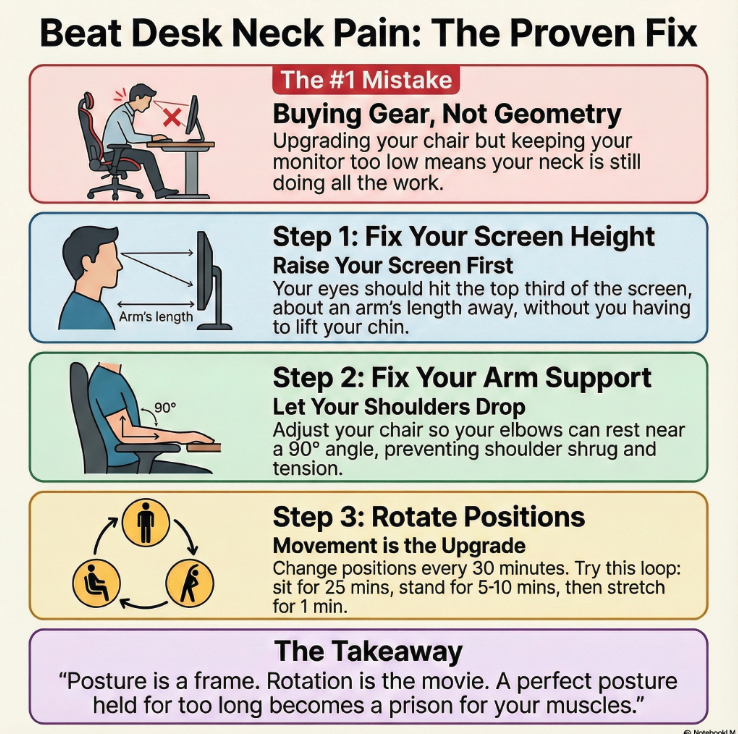
Seven workstation problems to check
The following are common setup problems to check. They are examples, not claims about the author’s symptoms or purchases.
- Check 1: a new chair does not correct a monitor that is difficult to view comfortably.
- Check 2: standing can still involve leaning or reaching. Check comfort in the standing position too.
- Check 3: prolonged laptop work may need separate screen and keyboard positioning. See the laptop workstation guide for related setup questions.
- Check 4: back support alone does not ensure the armrests, keyboard and monitor fit you.
- Check 5: measure the space and adjustment range before buying an accessory.
- Check 6: do not treat prolonged standing as an endurance goal or continue through worsening discomfort.
- Check 7: consider the screen, inputs, support and opportunities to move together.
- Check viewing height before comparing chair prices
- Standing exposes bad setup faster
- Rotation is the real “upgrade”
Apply in 60 seconds: Raise your screen until your eyes hit the top third without lifting your chin.
A workstation cannot rule out medical causes. Seek emergency care for sudden severe headache, headache with fever and stiff neck, or sudden neurological changes such as speech trouble, facial droop or limb weakness. New or worsening arm symptoms, weakness or balance trouble needs prompt medical advice; significant trauma needs urgent assessment.
Which option fits the problem you need to solve?
There is no universal winner. A chair may be the useful purchase when the existing seat cannot fit you; a sit-stand option may help when changing working height is a practical need. A cheaper adjustment may address the problem without either purchase.
Consider a chair: if you cannot comfortably support your feet, back or forearms with the existing seat and work surface. Check seat height, depth, armrest adjustment and fit under the desk. Try the chair and check return costs before committing.
Consider a sit-stand option: if an adjustable work surface would make changing position easier and it fits your space and equipment. Verify stability, usable height range and keyboard placement in both modes. It is optional, and standing is not a substitute for moving around.
- If you sit 4+ hours/day
- If arm/shoulder fatigue hits by hour 2–3
- If your desk height is fixed
Time/cost trade-off: compare adjustment range, fit and total purchase cost; faster pain relief is not established.
- If you need movement prompts every 30 minutes
- If hip/back stiffness is your main complaint
- If you can raise screen + keyboard correctly
Time/cost trade-off: Encourages breaks; costs can multiply (mat, keyboard, monitor arm).
Before spending, name the practical problem the purchase must solve and check whether an adjustment to existing equipment can solve it.
Show me the nerdy details
A fit check can identify awkward reaches and poorly positioned equipment, but it cannot establish the medical cause of symptoms. Consider medical advice if discomfort persists or worsens.

Equipment specifications and costs to verify
Use the table to identify the specification and total delivered price to check. No current market price survey or medical cost saving is established here.
For example, if the work surface is too high, a chair alone may leave the keyboard difficult to reach comfortably. Measure the seated and standing input heights you need before comparing product specifications.
| Item | Price to verify | Notes |
|---|---|---|
| Monitor riser / laptop stand | Check the current delivered price | Check stable support, viewing height and return terms |
| External keyboard + mouse | Check the current delivered price | Lets you raise the screen without raising your shoulders |
| Ergonomic chair (mid-range) | Check the current delivered price | Aim for adjustability: seat height, armrests, back support |
| Standing desk converter | Check the current delivered price | Great for renters; can be heavy and eats depth |
| Full sit-stand desk | Check the current delivered price | Check stability and return policy; shipping matters |
| Anti-fatigue mat | Check the current delivered price | Useful if you stand in short bursts (5–15 minutes) |
Neutral action line: Save this table, then confirm today’s price and return terms on the brand’s official page before you buy.
The options below are shopping examples, not insurance coverage tiers, treatment steps or promises of preventing flare-ups. Prices vary by model, region and retailer; check current listings and return terms.
- Option 1: stable screen support and separate input devices, if needed.
- Option 2: adjustments to the existing chair or a suitable foot support.
- Option 3: a replacement chair if the existing one cannot fit you.
- Option 4: a stable height-adjustable work surface if you need it.
- Option 5: other accessories only for a clearly identified task or space need.
Try adjusting the equipment you have and identify any remaining problem before purchasing. These examples do not establish a percentage of pain relief or a universal buying order.
Eligibility checklist + 60-second estimator
Before you spend anything, do this fast eligibility check. It’s binary on purpose. If you say “yes” to the wrong thing, you’ll buy gear that can’t solve your bottleneck.
- Yes/No: Can you raise your screen so your eyes land on the top third without lifting your chin?
- Yes/No: Can your elbows rest near 90° without your shoulders shrugging?
- Yes/No: Do you have at least 10 minutes per hour to change position?
- Yes/No: Do you get symptoms after 2–4 hours of sitting (not immediately at minute 5)?
- Yes/No: Is your main workstation a laptop screen below eye level?
One-line next step: If you answered “No” to screen height or elbow support, fix those first—before choosing chair vs standing desk.
This worksheet multiplies assumed daily minutes by workdays across 50 weeks. It does not estimate pain relief, prove time saved or predict earnings; enter your own hypothetical values for comparison.
Hypothetical time value: —
Neutral action line: Save the result, then choose the smallest upgrade that changes your daily geometry.
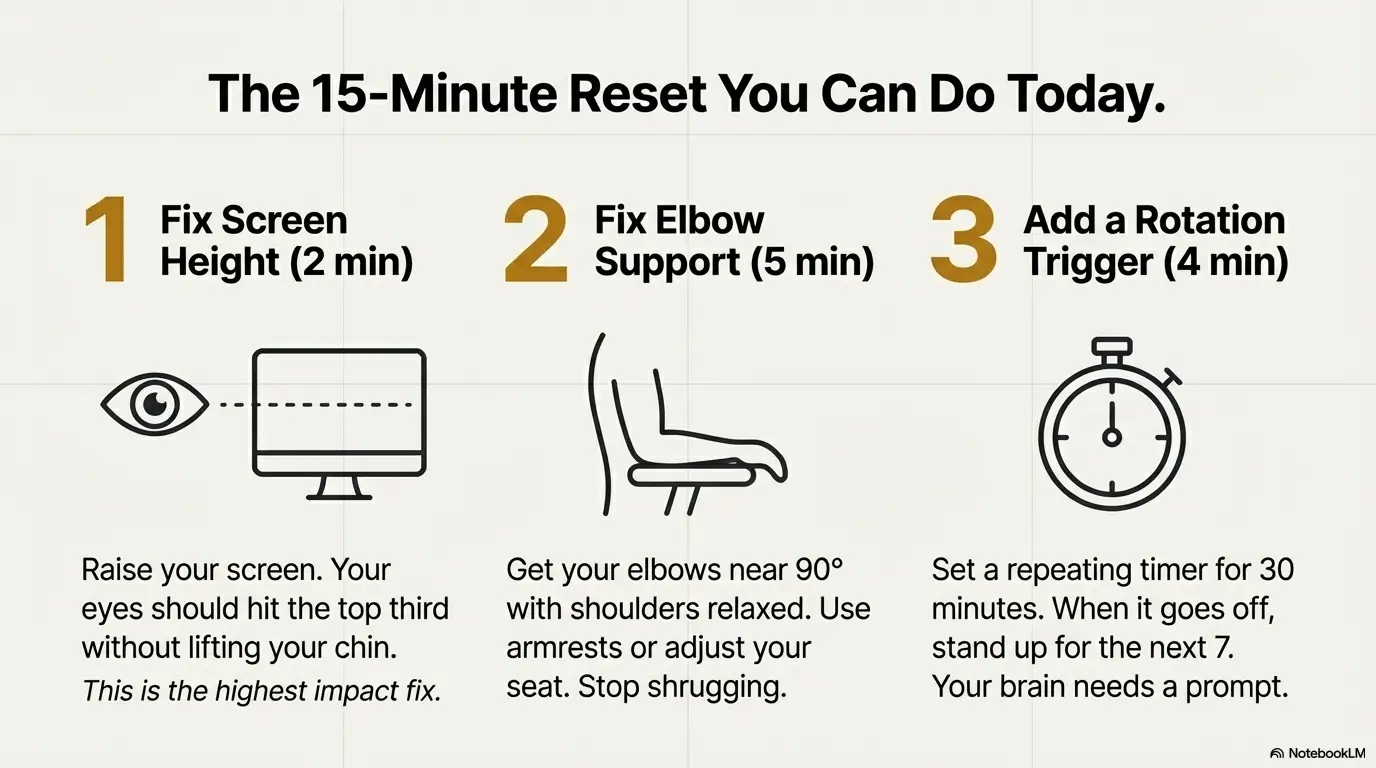
A 15-minute workstation adjustment example
This is an example of a workstation check, not a report of relief from the author’s neck pain. Take more or less time as needed, without holding an uncomfortable position.
Step 1: adjust the screen so it is comfortable to read without craning. For a raised laptop, use separate inputs so keyboard height can be adjusted independently. If bedtime phone use is also uncomfortable, the phone-in-bed guide explains related support checks.
- Comfortable viewing height without lifting the chin
- Screen about 50–70 cm away (roughly arm’s length)
- Text size increased so you don’t creep forward
Step 2 (5 minutes): Fix elbow support. If your shoulders rise, your neck joins the protest.
- Elbows near 90°, wrists neutral
- Armrests support forearms without pushing shoulders up
- Keyboard close enough that you don’t reach
Step 3 (4 minutes): Choose your baseline: chair or stand. The baseline should feel boring. If it feels heroic, it’s probably wrong.
- Sitting: feet supported, hips back, ribs stacked (no “computer hunch”)
- Standing: weight even, ribs down, screen still at correct height
Step 4: choose a reminder to change activity. The timing is a practical choice, not a required treatment dose.
Bold takeaway: If you change nothing else today, change your screen height and set one rotation trigger.
Show me the nerdy details
Most workstation “fixes” fail because people adjust the chair while keeping the screen too low. Screen height affects head position. Elbow support affects shoulder elevation. Those two changes reduce compensations that load the cervical spine during long durations.
Illustrative scenario: a standing setup that does not fit
Example only, not evidence of a treatment result
Illustrative scenario, not a product test: a person tries a sit-stand desk but finds that the keyboard is difficult to reach at standing height. Rather than assuming standing is treatment, they adjust the working height and stop positions that aggravate symptoms.
They check whether the desk supports comfortable input and viewing positions, then decide whether its adjustment range meets the need. The example does not claim a particular symptom improvement or justify working through pain.

An optional reminder plan for changing activity
Choose comfortable positions and change activity regularly. The example intervals below are optional reminders, not a validated ratio of sitting to standing or a proven treatment for neck pain.
The plan (repeat 3–5 times/day):
- 25–35 minutes seated (neutral setup)
- 5–10 minutes standing (same neutral setup)
- 60–120 seconds movement (neck + upper back reset)
A break can include putting the hands down, changing task, or walking when appropriate. Do not force a neck exercise during a work break.
- 10 slow shoulder rolls (down and back)
- 5–8 gentle neck turns each side (no forcing)
- 10 chest-opening breaths (ribs down, breathe wide)
- Short stands beat long stands
- Same geometry in both modes
- Change activity rather than holding a position through discomfort
Apply in 60 seconds: Set a repeating timer for 30 minutes and stand for the next 7.
Adjust reminders to your tasks and comfort. If standing aggravates symptoms, return to a comfortable position rather than completing a timer target.
Neutral action line: Save this rotation loop and test it for five workdays before you buy anything else.
Space, delivery, returns and power compatibility
If you live in a small apartment or share a workspace (hello, most of us), your setup constraints aren’t just “ergonomics.” They’re space, noise, shipping, and returns.
Delivery and returns: check assembled dimensions, usable desktop depth, return shipping fees, packaging requirements and any disassembly costs. A converter must leave enough stable space for the screen and inputs; use the actual model’s measurements.
Total price: confirm whether the displayed amount includes applicable tax, shipping, assembly and any import charges. Check delivery access for heavy frames rather than assuming a smaller product will fit.
Korea and other 220V regions: If you’re buying a motorized desk from an overseas store, check voltage compatibility and plug type. Also check building delivery rules. It’s not “ergonomics,” but it can determine whether your desk ever enters your home.
Pull-quote: The best desk is the one you can return without losing a weekend.
Neutral action line: Before ordering anything heavy, write down your doorway width, elevator rules, and the return window in days.
Buying checklist: what to measure before you pay
Record these measurements before comparing products so that an “ergonomic” label does not replace a fit check.
- Desk height: Measure in cm/in. Fixed desks often push shoulders up if too high.
- Elbow height seated: Sit relaxed, measure from floor to elbow.
- Screen height needed: Where your eyes land when you’re neutral.
- Desk depth: Can you place the monitor at arm’s length without falling off the edge?
- Standing elbow height: If standing, keyboard should rise to meet you—no shrugging.
Brand-neutral entity signals (for comparison, not hype): You’ll see chairs from Herman Miller, Steelcase, IKEA, and many mid-market brands; sit-stand frames from UPLIFT, Vari, FlexiSpot, and others. Don’t chase names first—chase adjustability and stability at your height range.
- Screen height is a neck decision
- Elbow support is a shoulder decision
- Rotation is a tissue decision
Apply in 60 seconds: Measure desk height and write it down before you open another product page.
Neutral action line: Take these measurements, then compare two options side-by-side on adjustability and return policy. If you’re also weighing “who actually fixes this,” a reality-check comparison like chiropractor vs physical therapy for pain and function can help you choose the next step without guesswork.
💡 Read Mayo Clinic’s overview of neck symptoms and when to seek care
FAQ
Start with a fit check. Consider a chair when the current seat cannot support a comfortable working position; consider a sit-stand option when adjustable working height is the practical need. Neither is required solely because you have neck pain.
Apply in 60 seconds: Check whether your eyes land on the top third of the screen without lifting your chin.
There is no single sitting-to-standing ratio established here as treatment. Change position at comfortable intervals and avoid turning standing into a prolonged static posture. Stop or adjust a position that worsens symptoms.
Optional check: choose a comfortable change of activity; a seven-minute stand is not required.
Standing may be uncomfortable if the screen, input height or reach does not fit, or if the position is held too long. Adjust or stop the aggravating activity; do not assume a desk change explains every cause of neck pain.
Apply in 60 seconds: While standing, relax your shoulders and see if your hands can type without reaching.
Try adjusting the equipment you own before comparing prices. A stable screen support with separate inputs may be useful for laptop work, but usefulness depends on fit. No accessory is established here as the cheapest or most effective treatment.
Apply in 60 seconds: Put your laptop on a stack of books and see if your neck stops dipping down.
Name the specific fit problem, compare two options that address it, and check the delivered price and return costs. You do not need to move through a sequence of upgrades or complete a five-day trial before seeking medical advice.
Apply in 60 seconds: Write your bottleneck sentence before buying the next item.
Seek emergency care for sudden severe headache, headache with fever and stiff neck, or sudden neurological changes. New or worsening arm weakness or balance difficulty needs prompt assessment. Workstation changes do not replace clinical assessment.
Apply in 60 seconds: Note any red-flag symptoms and write down when they started before you book an appointment.
Conclusion: your next 15 minutes
Choose equipment by the practical fit problem it addresses, its adjustment range, and the return terms. A more expensive setup does not establish a better treatment result.
If you only have 15 minutes today, do this in order:
- 5 minutes: Raise your screen and increase text size so you stop creeping forward.
- 5 minutes: Fix elbow support so your shoulders can drop.
- 5 minutes: Set a repeating timer and run the seated/stand rotation loop once.
Try comfortable adjustments to the equipment you have and record what remains difficult. Compare products only for that specific need. Persistent or worsening symptoms need medical advice rather than an automatic upgrade.
Targeted trust and safety review: 17 October 2026. Removed personal treatment and product-test claims, unverified price ranges, and a universal buying order; clarified optional timing and hypothetical arithmetic, and added missing/invalid-input checks to the worksheet. Earlier safety update: 13 October 2026. Sources: OSHA workstation purchasing guide, NHS neck-pain guidance, and NHS headache warning signs. Stories are illustrative. Rotation times and shopping examples are not validated treatment rules; calculator outputs are hypothetical arithmetic.
Targeted editorial update: October 21, 2026. Added a topic-specific record, question and follow-up guide and revised the title and search description. Existing useful material was retained; this update is not a complete medical, legal or insurance review. Confirm individual instructions, current prices and benefits with the relevant service.