
This site is written from a family-caregiver perspective. The operator is not a medical professional. This article provides general education and preparation prompts rather than an individual assessment.
Keep viewing comfort separate from medical assessment
Use these prompts to prepare questions and arrangements. They do not diagnose a condition, determine coverage or clear an activity.
- What to record
- Viewing position, font size, support, sleep disruption and any changing neck or arm symptoms.
- What to ask
- Can the task move to a more manageable setting, and do persistent symptoms need review?
- Next action and owner
- Make practical changes without forcing a rigid posture; do not continue a provoking position to complete a self-test. Write down who will act and when to follow up.
Keep personal records private. You can use the visit preparation organizer to arrange questions; do not post identifying health information in comments.

Neck discomfort during phone use in bed can make it difficult to settle down or find a comfortable sleeping position. Start by reducing the activity that aggravates your symptoms, rather than assuming you need an expensive pillow or a particular stretching routine.
“Tech neck” describes neck symptoms associated with device use; it is not a diagnosis you can confirm from posture alone. A low screen, awkward support, or a long period without changing position may aggravate discomfort. The guide to phone-related and other neck symptoms explains why similar symptoms can have different causes.
This guide offers practical comfort adjustments and signs that need medical attention. It does not report a personal treatment trial or establish that scrolling has damaged your neck.
Check the warning signs first, then choose one or two changes to screen position, arm support, or scrolling time. Keep an adjustment only if it feels comfortable; no single position or timer schedule works for everyone.
About the examples: the scenarios below illustrate everyday decisions. They are not patient histories, product tests, or evidence of a guaranteed result.
Start with comfort and review the warning signs.
No heroics.
Just better angles, fewer minutes, and a clean plan.
- Warning signs and when to get checked
- Optional screen, arm-support and break checks
- Habits involving screen position, support and scrolling time
Table of Contents
Why phone use in bed may aggravate neck discomfort
Daytime scrolling is annoying. Phone-in-bed scrolling is sneaky. Your body is trying to downshift into sleep, but your neck is being asked to do tiny, repetitive “support work” in a position you’d never choose on purpose.
In bed, the problem is rarely just “looking down.” It’s the combo: soft surfaces + unstable head support + long stillness. Your pillow compresses, your head drifts forward, your shoulders round, and your neck muscles do the quiet overtime that never gets a standing ovation.
For example, someone may notice stiffness after a long evening of scrolling and again the next morning. That timing is useful to record, but it cannot show whether the cause is muscle tension, sleep position, a nerve problem, or something else.
- Bed is a trap for stillness: less movement means less relief.
- Soft support shifts: your neck loses the “neutral” it thought it had.
- Eyes drive posture: wherever your gaze goes, your head follows.
- Fatigue makes you bargain: “I’ll fix it tomorrow” becomes a lifestyle.
Show me the nerdy details
Awkward support or staying still may aggravate symptoms. Their timing does not establish which tissues are involved or prove that a particular sleeping position caused an injury.
Humor check: if your phone is “helping you unwind,” but your neck is filing a formal complaint, you’re not unwinding—you’re negotiating with physics.

Warning signs: when to seek medical care
Check for warning signs before trying stretches or equipment changes. New neurological symptoms or symptoms after an injury should not be treated as an ordinary posture problem.
- A position change may alter comfort without establishing the cause
- Some pain is “nerve-ish” and needs a different approach
- Some pain has red flags—don’t DIY those
Apply in 60 seconds: Do the checklist below and pick one lane: fix tonight vs get checked.
Eligibility checklist (yes/no + next step)
Answer YES/NO:
- YES if you had a recent fall/impact or a sudden severe injury-type pain.
- YES if pain shoots into an arm with new numbness, weakness, or clumsy grip.
- YES if you have fever, unexplained weight loss, or severe headache with neck stiffness.
- YES if pain is worsening despite reasonable self-care; do not wait for a fixed day count.
- Remember: improvement with movement does not rule out a condition needing care.
Seek emergency care for a sudden severe headache, headache with fever and stiff neck, or sudden neurological symptoms such as speech trouble, facial droop or limb weakness. Significant trauma also needs urgent assessment. New or worsening arm symptoms, weak grip or balance difficulty needs prompt medical advice. A “no” checklist does not prove that symptoms are harmless.
For mild symptoms without warning signs, note whether a comfortable change of position alters the discomfort. Use the observation to describe your symptoms, not as a diagnostic test.
- A comfortable position change may identify an aggravating activity, but quick relief does not diagnose the cause or exclude a medical problem.
- If position barely changes it and symptoms radiate or feel electric, don’t brute-force stretches—this is where it helps to recognize patterns like neck and shoulder pain from laptop work (especially when shoulders, traps, and arms are part of the story).
Show me the nerdy details
Position-sensitive pain often involves overloaded muscles and irritated joints. Symptoms that radiate, feel sharp/electric, or come with weakness can involve nerve irritation or other issues and should be assessed appropriately. This article can’t diagnose you; it can help you stop feeding the problem with bedtime habits.
If it is uncomfortable to keep using the phone, stop the session rather than repeatedly stretching so you can continue.
Nine habits to review if scrolling is uncomfortable
Here’s the pattern: angle + stillness + repetition. The habits below look harmless alone. Together, they quietly rack up minutes in your worst positions—then you wake up with “mystery pain” and blame your pillow like it betrayed you personally.
Try one or two comfortable adjustments and note your response. There is no guaranteed improvement within 48 hours, and symptoms after scrolling do not establish repeated tissue injury.
Mini calculator: “How much neck overtime are you paying?”
Planning example: For 30 minutes and a 12-minute interval, two breaks before the session ends total 40 seconds.
No storage. This is just a quick decision nudge.
Neutral close: Save your numbers and set a timer—then see how your morning feels after 3 nights.

Habits 1–3: the “angle problems” that quietly overload your neck
Habit 1: “Chin tucked into the phone”
Holding a phone low can leave your neck bent for longer than you intended.
Try: bring the screen to a comfortable viewing height and support your arms if needed. Avoid trading neck discomfort for shoulder strain. There is no required two-inch adjustment.
Habit 2: “One pillow becomes three”
Extra pillows can push the head into an uncomfortable position. The useful question is how your head and body line up, rather than how many pillows you own.
Fix: Use one supportive pillow, then support your arms (not your head) with a small cushion so your shoulders stop collapsing inward.
Habit 3: “Side-lying twist + phone in front”
Side-lying while looking at a phone placed ahead of you may keep your neck turned. If that position aggravates symptoms, change it or put the phone away.
Fix: If you must side-lie, keep your phone in line with your chest (not forward), and put a pillow or rolled towel behind your upper back so you don’t collapse into a twist.
- Quick test: Can you align ear → shoulder within 10 seconds?
- Quick win: Support arms first; neck follows.
- Quick boundary: If you can’t keep it comfy, stop scrolling and switch to audio.
Small joke, real point: If your neck is doing yoga while you’re watching videos, that’s not relaxation—that’s a very quiet workout.
Habits 4–6: the “grip and gaze problems” that keep the ache alive
Habit 4: “Death grip + tiny screen”
A tight grip or unsupported arms can make it harder to keep your shoulders relaxed.
Fix: Loosen the grip by changing the tool: pop socket, ring holder, or a stand. Your goal is boring: no shrugging. If your shoulders creep up within 30 seconds, change position. (If this sounds suspiciously like your workday too, this guide on neck-and-shoulder pain from laptop work is the same story in different clothing.)
Habit 5: “Brightness up, face closer”
Low light makes you pull the phone closer without noticing. Closer phone usually means more neck rounding.
Fix: Increase font size and use night mode, then keep the phone farther away. Give yourself one rule: “Text gets bigger, phone stays higher.”
Habit 6: “Micro-pauses that never become breaks”
Pausing between clips may leave you in exactly the same position. A useful break includes putting the device down or changing activity.
Try: use a reminder to put the device down and change position. The calculator’s 12-minute interval and 20-second pause are optional planning inputs, not a clinically validated exercise dose.
- Change the tool (stand/grip)
- Change the text (bigger font)
- Change the rhythm (timer breaks)
Optional adjustment: put the device at a comfortable height and decide when to stop.
Neutral close: Save your timer setting and confirm your phone’s screen-time tools (iOS Screen Time / Android Digital Wellbeing) are enabled before you compare “good” vs “bad” nights.
Habits 7–9: the “sleep and stress problems” that make it stick
Habit 7: “Late-night scrolling = sleep debt posture”
If scrolling delays sleep, set a stopping point that you can realistically follow. A fixed bedtime does not guarantee that neck symptoms will improve.
Fix: Create a hard switch: at a set time, phone becomes audio-only. Podcasts win because your eyes stop driving your neck.
Habit 8: “One-sided sleeping after scrolling”
Check whether your phone position leaves you sleeping with your neck twisted. Adjust the support to a comfortable position before settling down.
Try: put the phone away and settle into a comfortable sleeping position. You do not need a timed roll onto your back to “neutralize” the neck.
Habit 9: “Fixing pain with aggressive stretching at midnight”
Forcing a stretch through pain is unnecessary. If movement makes symptoms worse, stop rather than increasing the force.
Fix: Use only comfortable movement, without a required repetition count. Stop if it worsens symptoms or causes new arm symptoms.
- Rule of tired you: if you’re yawning, your posture is about to get weird.
- Rule of smart you: switch to audio before your neck complains.
- Rule of tomorrow you: a calmer neck is a better morning.
- Audio-only after your cutoff
- Settle into a comfortable sleeping position
- Gentle range beats midnight hero stretching
Apply in 60 seconds: Set an “audio-only” cutoff for tonight and prep your podcast now.
Three optional setup checks for more comfortable phone use
These three setup checks are optional comfort measures. Try them without forcing a posture or delaying assessment for concerning symptoms.
Move 1 (2 minutes): Build a “screen shelf”
Make the phone higher without straining your arms. Use a pillow, folded blanket, or a stand. The goal is simple: eyes forward. If your chin is drifting down, the shelf is too low.
Move 2 (20 seconds): Support your arms
Try supporting your elbows so you do not need to hold the device with tense or raised shoulders. Keep the support only if it is comfortable.
Move 3: Put the device down and change position
Roll shoulders gently back, look across the room, breathe out slow. That’s it. Your neck doesn’t need punishment; it needs interruptions.
Show me the nerdy details
These setup changes are options for comfort. The article does not compare their treatment effects or establish that one arrangement works better for everyone.
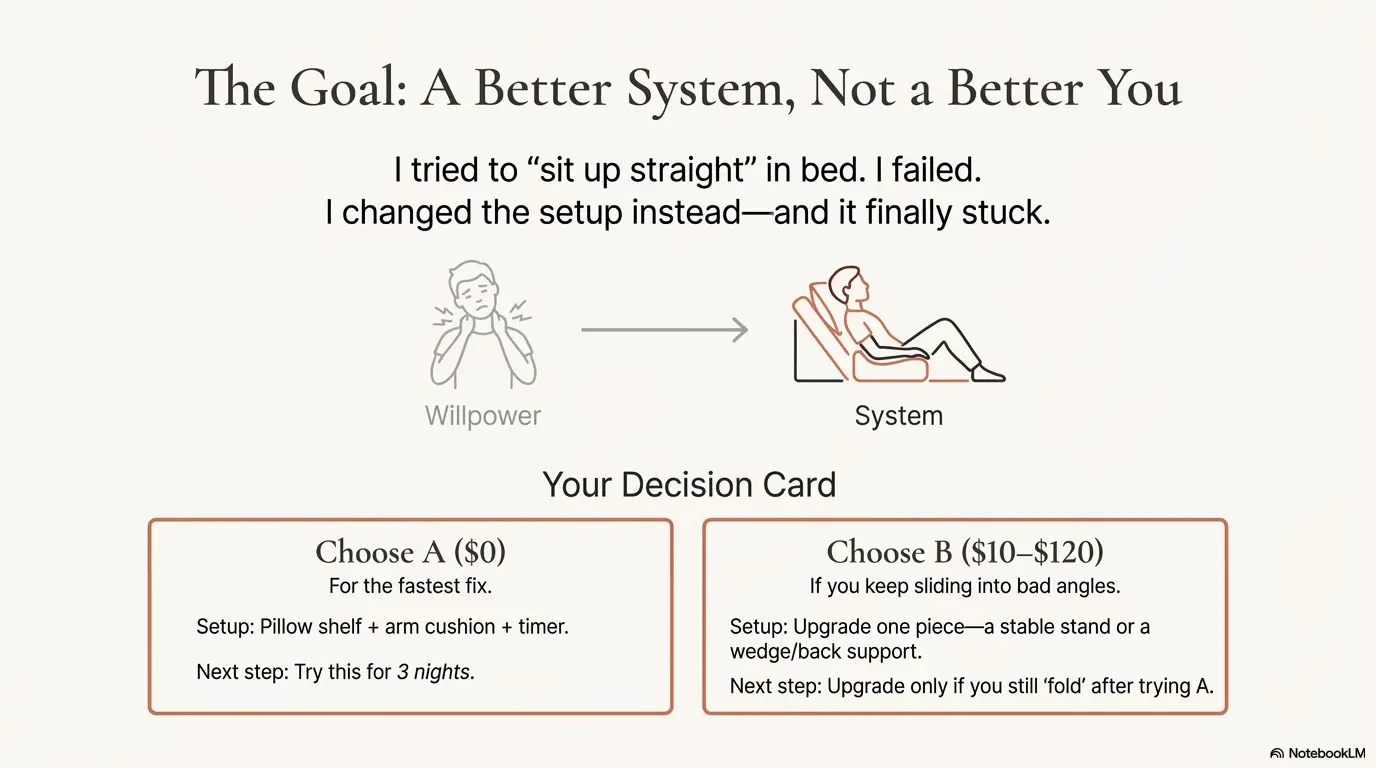
Decision card: When A vs B (time/cost trade-off)
Choose A if… you want to try an arrangement using items you already own.
- Time: 3 minutes
- Cost: $0
- Setup: pillow shelf + arm cushion + timer
Choose B if… you keep sliding into bad angles even with A.
- Time: 10 minutes to set up once
- Cost: retailer-dependent; no current price survey is provided
- Setup: stable stand + wedge/back support to reduce slumping
Next step: assess comfort before buying anything. A product upgrade is optional and is not a treatment for persistent symptoms.
Check comfort rather than posture perfection: an adjustment should make the activity easier, not require you to hold a rigid position.
Equipment costs and when to get medical advice
Equipment is optional and does not replace assessment. The NHS neck-pain guidance recommends seeking advice when symptoms persist for a few weeks, worry you, or include symptoms such as pins and needles or a cold arm. Do not wait that long for urgent warning signs.
Self-care, guided rehabilitation and specialist assessment are possible parts of care, not insurer-defined tiers or a required sequence. New neurological symptoms may need assessment before any home experiment.
Before paying for equipment or care
| Next step | Time | What to verify | Notes |
|---|---|---|---|
| Phone stand / grip aid | 5 minutes | Check the current retailer price | Stability reduces “death grip” shrugging |
| Wedge/back support | 10 minutes | Check the current retailer price | Useful if you keep collapsing into flexion |
| Primary care / telehealth check | 15–30 minutes | Varies by plan | Ask about red flags, referral, and next-step criteria |
| Physical therapy evaluation | 45–60 minutes | Copay/out-of-pocket varies | Coverage tiers depend on deductible and visit limits |
Neutral close: Save this table and confirm the current fee on the provider’s official page.
Quote-prep list (what to gather before comparing)
- Your symptom timeline: start date, worst days, and what triggers it
- Any radiation: arm numbness/tingling, weakness, headaches
- Your plan basics: deductible status, copay, referral requirements, visit limits
- Your goal: pain relief, sleep improvement, return to workouts, or work tolerance
Ask for network, coverage and authorization details for the proposed service. An organized list may help the discussion, but it cannot guarantee fewer calls or prevent every unexpected bill.
The Mayo Clinic neck-pain guidance describes when injury, severe pain with fever, or weakness needs emergency assessment. Use a qualified clinician to evaluate the cause rather than choosing a treatment from a symptom checklist alone.
Quick regional notes: Korea, UK, and US readers
In any country, describe the symptom timeline and ask what would change the assessment or treatment plan. Access to imaging does not mean a scan is automatically needed. New weakness or difficulty walking needs urgent assessment rather than a shopping or posture experiment.
Use the appropriate local healthcare service. In the US, confirm the clinician’s network status and your plan’s referral and authorization requirements for non-emergency care. Do not delay emergency care while comparing prices.
- Universal tip: Write down what makes it worse and what helps within 60 seconds.
- Universal question: “What would make you escalate care?”
- Universal boundary: If you have new weakness, don’t self-manage alone.
Illustrative scenario: changing an uncomfortable scrolling habit
Illustrative scenario, not a patient account: a person notices discomfort while scrolling on their side. Instead of assuming a new pillow will cure it, they put the phone down and note the activity, location of symptoms, and whether arm symptoms are present.
At the next comfortable opportunity, they try a supported screen position and a shorter session. If symptoms worsen, persist, or include warning signs, they seek medical advice. The example illustrates a decision process, not a promised recovery.
Infographic: the bedtime phone-to-neck chain reaction (and the breakpoints)
Bedtime Tech-Neck Loop: where it starts, how it grows, where to break it
1) Phone goes low
Eyes drop → head follows.
Breakpoint: adjust the screen to a comfortable height.
2) Chin drifts forward
Neck muscles “hold” quietly.
Breakpoint: arm support reduces shoulder pull.
3) Shoulders round
Upper back stiffens, neck feels trapped.
Breakpoint: a reminder to put the device down and change activity.
4) Sleep happens in the twist
You wake up stiff and confused.
Breakpoint: a comfortable sleeping position before sleep.
Operator tip: You don’t need perfect posture—just fewer minutes in the worst angles.
- Raise the phone
- Support the elbows
- Interrupt stillness
Apply in 60 seconds: Build the phone shelf and set your 12-minute timer now.
FAQ
1) How do I know if my neck pain is really from phone-in-bed scrolling?
Symptoms that change during scrolling can help you describe an aggravating activity. Comfortable screen and arm adjustments may help, but this response cannot confirm a phone-related diagnosis. Record the pattern and seek assessment for persistent or worsening symptoms.
2) Is it okay to use my phone in bed if I’m careful?
If using the phone aggravates your symptoms, shorten or stop the session. A supported screen and relaxed arms may make it more comfortable, but there is no setup that guarantees safety or prevents every cause of neck pain.
3) What’s the fastest fix if I only do one thing?
Put the phone down first if using it hurts. If you resume, try a comfortable screen height with supported arms and change position periodically. A response to that adjustment is not a diagnosis or evidence that it is the best treatment.
4) Do I need special pillows or a wedge?
Not necessarily. Try a comfortable arrangement with what you already have. Buy a support only for a specific practical need, and check fit and return terms. Persistent symptoms are a reason to seek advice, not automatically to buy another product.
5) When should I see a clinician?
If pain persists beyond a couple of weeks despite sensible changes, worsens, radiates with numbness/weakness, or follows an injury, get assessed. You’re not “overreacting.” You’re protecting function. 60-second action: write a one-line symptom timeline and bring it to your appointment.
6) Can I do stretches to fix it?
Gentle movement may be appropriate, but do not force the neck through pain or follow a fixed repetition count as a treatment prescription. Stop if symptoms worsen or new arm symptoms appear, and seek appropriate advice.
Conclusion: your 15-minute next step
Choose one comfortable adjustment and reduce the activity that aggravates symptoms. The goal is manageable device use, not a perfect posture or a guaranteed overnight cure.
Your next step is simple and honest: spend 15 minutes tonight building the setup that tired-you can keep. Do it in this order:
- 3 minutes: build the phone shelf (raise the screen)
- 2 minutes: support elbows (reduce shoulder pull)
- 1 minute: set a 12-minute timer
- 3 minutes: pick your audio-only cutoff
- 6 minutes: test for comfort, adjust once, then stop tinkering
Record when discomfort occurs, where it is felt, and any arm or neurological symptoms. Bring that record to a clinician if symptoms persist or worsen. The neck-symptom guide can help organize those observations, but cannot diagnose the cause.
Targeted trust and safety review: 17 October 2026. Removed first-person treatment claims, clarified illustrative scenarios and optional timer inputs, and removed unverified equipment price ranges. Earlier safety update: 13 October 2026. Sources: NHS neck-pain guidance and NHS headache warning signs. Stories are illustrative. Break timing and the calculator are planning examples, not a validated treatment dose or diagnostic test.
Targeted editorial update: October 21, 2026. Added a topic-specific record, question and follow-up guide and revised the title and search description. Existing useful material was retained; this update is not a complete medical, legal or insurance review. Confirm individual instructions, current prices and benefits with the relevant service.