
Keyboard and mouse placement can change reach and working posture. It cannot diagnose the cause of leg pain or establish that a workstation adjustment treats sciatica. For desk work with sciatica or unexplained leg symptoms, compare the actual task, the layout constraint, a proposed change and what really happened. A more comfortable arm position is useful information; it is not proof of nerve recovery or fitness for work.
Start with the layout and constraint comparison, use six essential checks, read two fictional writing examples, or build a private setup-change record. This guide focuses on input-device layout and the consequences of changing it. It supplies no required work-block length, safe sitting limit, treatment score or product prescription.
Get care rather than completing a desk experiment. New difficulty starting urination or inability to urinate, new bladder/bowel control changes, saddle-area numbness, or severe/worsening weakness or numbness in both legs needs emergency care immediately. Do not drive yourself to emergency care. New foot weakness, foot drop, worsening numbness or unsafe walking needs prompt clinical assessment. Do not wait until the end of a work session to report a concerning change. See NHS sciatica guidance and MedlinePlus sciatica information.
This is general education from a family-caregiver-run website. Its operator is not a medical or ergonomics professional. It is not an individual clinical assessment, workstation inspection or work clearance. You can seek clinical care or workplace help without photographs, measurements, a completed log or a failed adjustment trial.
Table of Contents
Keyboard and mouse placement: compare the actual constraint
Begin with a task already experienced: typing, pointer-heavy work, document reading, calls or a combination. Describe what was difficult to reach or use. Do not deliberately repeat a painful task to obtain a baseline. A shared desk, a fixed work surface or limited equipment permission can matter as much as where a mouse sits.
| Observed layout / constraint | Possible discussion with the relevant contact | What to check after an actual change |
|---|---|---|
| Mouse beyond a notebook or far from the keyboard | Review frequently used item positions and the space needed for both devices. | Did another item, document task or access need become harder to reach? |
| Keyboard and mouse do not fit together on a tray | Review tray capacity, layout and permitted equipment options. | Are working space, stability, leg clearance and other tasks still workable? Nearer is not automatically suitable. |
| Chair arms prevent access to a fixed desk | Ask for a whole-layout review rather than forcing the chair under the surface. | Does the change affect arm support, foot support, viewing or clearance? Do not modify equipment from a blog instruction. |
| Laptop screen and keyboard move together | Discuss how screen viewing and input-device needs can be addressed together. | Raising the screen may raise the keys; moving the keys may change viewing. No accessory is prescribed. |
| Shared station or restricted equipment changes | Identify who can review changes and what arrangements are actually available. | A suggested change, permission to make it and actual implementation are separate. |
| Long uninterrupted input-device task | Discuss task organization, variation and available opportunities to change position. | Was the arrangement usable in real work? A comfortable layout does not remove every task demand. |
The comparison identifies questions, not a hierarchy of fixes. Moving devices, changing the chair, reviewing the surface or reorganizing the task may require different people. Do not assume the keyboard must always move first, that standing is the answer, or that an accessory purchase is required.
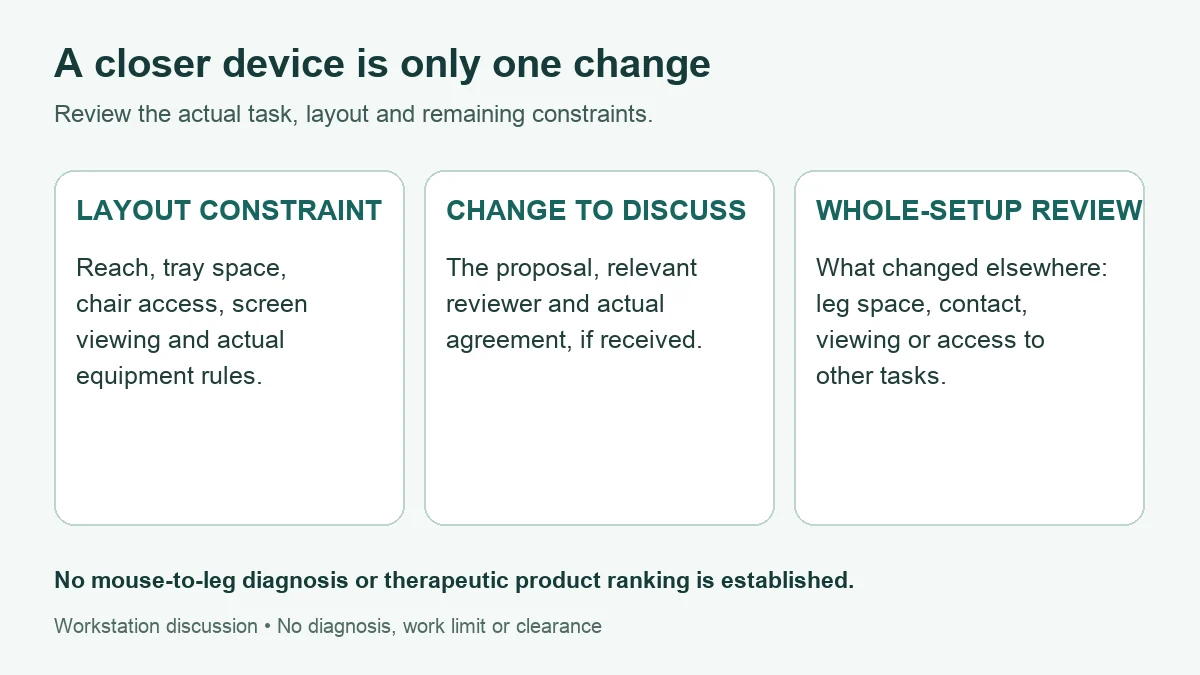
What the sources support about keyboard and mouse placement
OSHA’s keyboard guidance describes awkward postures associated with a device that is too near or too far away. It recommends considering the keyboard alongside other workstation components. This supports reviewing layout and reach. It does not establish that shoulder movement produces a specific pelvic change or explains a person’s one-sided leg pain.
OSHA’s pointer/mouse guidance discusses device location, hand fit, force and settings. Those are useful workstation questions. They are not evidence that the side of the mouse identifies the cause of symptoms in the same-side leg. This page makes no mouse-to-sciatic-nerve mechanism claim and does not rank a trackball, compact keyboard or tray as a sciatica treatment.
OSHA’s working-position guidance describes supported, comfortable working positions and the importance of changing position. A reference posture is not an endurance pose. Individual clinical advice and actual task constraints still matter. There is no universal set of angles or a fixed sit–stand schedule prescribed here.
Keep the inference proportionate to the observation. “My arm reach felt easier after a layout change” describes an experience. “The mouse caused my leg pain” goes beyond it. If several things changed together, improvement cannot isolate one cause. Persistent symptoms after a change also do not prove that the workstation has no relevance; the situation may still need both clinical and workplace review.
Six essential checks for a desk setup change discussion
Describe the task you actually performed
Record which input devices and documents were used, the observed barrier and any relevant context already known. Approximate timing can be included if remembered, but the article asks for no full workday or symptom-onset test. Do not reproduce discomfort, numbness or weakness to make the description more precise.
Keep existing instructions and constraints visible
Record relevant clinical advice, equipment instructions and workplace rules actually received, with source and date if known. Mark missing information as unconfirmed. Do not borrow another person’s restrictions or turn general ergonomic information into an individual prescription. If instructions conflict, ask the responsible people to clarify.
Review the layout as a system
Consider access to the keyboard, mouse, screen and documents together with chair support, foot support and leg space. An isolated change may create another difficulty. Use ordinary observations rather than forcing a supposedly correct posture. Stop using an adjustment that is causing a new problem and seek appropriate help; do not hold it until a timed session ends.
Separate a proposal from agreement and implementation
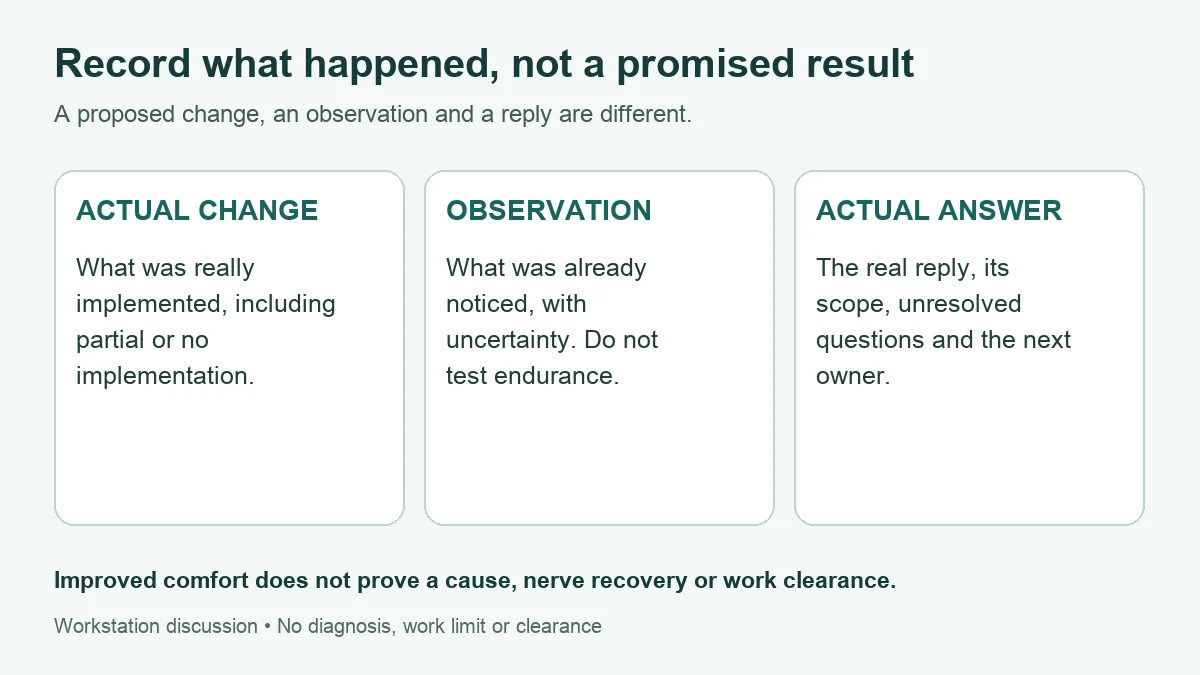
Write an idea as a proposal until the relevant person has actually responded. Record what was agreed, any conditions and the responsible role. Then record what really changed, including partial or no implementation. A sent request does not establish permission, and a purchased item does not establish a suitable setup.
Record existing observations and remaining trade-offs
Describe easier, unchanged, worse, mixed or not yet observed without explaining the cause yourself. Did a nearer mouse leave less room elsewhere? Did a chair adjustment change viewing or foot support? You do not need to complete a work block to record a concern. Keep new or changing leg symptoms separate for clinical assessment.
Keep the actual answer with its scope and next owner
Record whether a question is only prepared, was sent or received an answer. Keep the actual reply distinct from your interpretation. General layout advice is not a medical explanation, treatment result or clearance for longer work. Record any real next arrangement; do not invent a review date, response deadline or work limit.
OSHA’s workstation evaluation checklist considers component placement, support, clearance and task organization together. It is a useful source of review questions. Completing a blog checklist is not the same as a professional assessment, and it does not certify an individual’s ability to continue work.
OSHA’s work-process guidance also addresses repetition, static posture and task organization. Use that broader context when discussing an arrangement; a closer keyboard alone cannot guarantee that an uninterrupted task becomes manageable. This article generates no break dose or compulsory observation period.
Who can answer the layout, work and symptom questions?
| Role | Useful contribution | Boundary to preserve |
|---|---|---|
| Worker / person using the setup | Describe real tasks, constraints, changes already noticed and the help needed. | An observation is not a diagnosis or proof of treatment benefit. No need to prove endurance before asking. |
| Workplace ergonomics / safety contact | Review the actual task, layout, equipment and potential trade-offs. | A blog diagram or personal worksheet is not a workstation inspection. |
| Supervisor / implementation owner | Clarify feasible task or equipment arrangements, responsibilities and actual implementation. | A planned change is not proof that the arrangement is available or clinically appropriate. |
| Treating clinician / occupational health | Assess symptoms and provide individual advice relevant to actual tasks. | This page supplies no restrictions, diagnosis or fitness-for-work certificate. |
| Relevant IT / equipment contact | Clarify supported equipment, settings, installation and service questions. | Device compatibility is not evidence of symptom relief or medical suitability. |
Share only the information relevant to the recipient and use the appropriate private route. A layout reviewer may need a task description without your complete health history. Do not upload identifiable workplace screens, client documents, names or full medical records into a public form. If a photo is useful and permitted, protect confidential content; no photo is required to start a discussion.
Two fictional examples: a remaining constraint and persistent symptoms
These are invented writing examples, not real readers, case reports or evidence of benefit. They demonstrate accurate notes without a promised improvement. Neither asks someone to work through symptoms. The tool’s example buttons replace current entries; export any private work before loading one.
Example A: a nearer mouse leaves a tray constraint unresolved
| Record | Fictional entry |
|---|---|
| Actual work / constraint | Mouse-heavy document work at a fixed station with a narrow tray. |
| Proposal / agreement | A layout review was reportedly agreed. No replacement tray is confirmed. |
| Actual change | The mouse was moved nearer the keyboard during an existing change. |
| Existing observation | Reach felt easier, but the tray remained cramped and less leg clearance was reported. No treatment effect is established. |
| Unanswered question | Can the responsible contact review remaining space and clearance? The question is prepared; no actual reply is recorded. |
A concise note could read: “The mouse is now nearer, but the tray is still cramped and I noticed less leg clearance. I need help reviewing the whole layout. No replacement tray or next arrangement has been confirmed.” This is more useful than declaring the setup fixed because one device moved.
Example B: arm comfort changes while leg symptoms persist
| Record | Fictional entry |
|---|---|
| Work already experienced | Typing and document work after a previous input-device adjustment. |
| Observation | Arm reach felt more comfortable by personal report, but leg symptoms persisted. |
| What it means | The entry neither establishes nor excludes a cause. It does not prove that further ergonomic changes will resolve the symptoms. |
| Separate clinical question | What assessment is appropriate for the persistent leg symptoms? New or worsening neurological concerns should not wait for another trial. |
| Actual follow-up | A clinical question is prepared; no reply, appointment, work clearance or recovery date is invented. |
A discussion note could say: “The previous layout change helped arm comfort, but my leg symptoms continue. I would like advice about assessment separately from the remaining workstation questions.” Do not wait for a second product, a perfect diary or the end of a workday to seek appropriate help.
Free desk setup change record and question tool
The tool keeps the actual task, constraints, proposed change, actual agreement, implementation, trade-offs, observations and real replies separate. Blank fields produce optional questions. A filled field is not authenticated evidence; an empty one is not a failed safety test or a reason you cannot ask for help. The form generates no diagnosis, product choice, sitting limit, break schedule or work clearance.
Try the fictional examples online. Download the offline HTML copy before entering actual health or workplace notes. The live site may use site services. The downloaded tool contains no ads, analytics, external assets, browser storage or automatic network requests. No account or email is needed. Entries are not saved automatically; exports contain your entries and should be kept private.
Build a record, copy it, download text or print/save PDF through your browser. Editing any field hides the old output until rebuilt. Nothing is submitted or sent. Avoid names, employer identifiers, confidential work and complete medical records. Use paper with the same headings if the tool does not load. Do not delay care or test work tolerance to complete it.
Desk setup change record and discussion questions
Separate actual work, a proposal, real implementation, observed changes and actual replies. No diagnosis, treatment effect, safe work duration or work clearance is generated.
For actual health or workplace notes, download the offline tool first. Try the fictional example here. The offline copy contains no site ads, analytics or external assets and needs no account.
Offline copy. This file contains no ads, analytics, external assets or automatic network requests.
The tool uses no network requests or browser storage. Unsaved changes can be lost on refresh or close. Exported files contain your entries; keep them private. Avoid names, employer identifiers, confidential work and full medical records.
Start with the fictional example or download a blank offline copy.
If this tool does not load, use paper: actual task and layout; proposal and agreement; actual change; existing observation; real reply and open question. Do not delay care or test endurance to fill it in.
My desk setup change record
Unverified personal record for discussion. These are personal notes, not a workplace assessment, medical certificate or work clearance. A completed form proves no cause or safety; an incomplete record does not prevent asking for help.
Guide: living.kioptrix.com/desk-job-sciatica-keyboard-mouse-placement/
Questions about desk work, keyboard and mouse placement
Can a distant keyboard explain my one-sided leg pain?
It can be a reason to review reach and working posture, but this guide establishes no diagnosis or causal link to a particular leg. Keep the workstation observation and clinical question separate.
Should I move the chair or devices first?
There is no universal first move. The actual constraint may involve surface height, armrests, screen viewing, leg space or equipment rules. Review the relationships together rather than forcing one change.
Must I try the new layout for a full work session?
No. This guide asks for no endurance test or required trial period. Record work already experienced, and do not continue an uncomfortable or worsening situation merely to collect a result.
Would a compact keyboard, tray or trackball treat sciatica?
This article establishes no such treatment effect. An equipment option may address a specific layout or input task after review, but compatibility, task suitability and symptoms remain separate questions.
Does improved comfort prove that a nerve problem improved?
No. A personal comfort observation does not establish nerve recovery, a cause of pain or clearance to increase work. Describe the change without claiming an explanation.
Do I need a complete log before asking for help?
No. These are optional discussion prompts. Seek appropriate clinical or workplace help when needed; no failed experiment, photograph or complete shift record is required by this guide.
For the wider conversation about duties and available work arrangements, see Desk Work With Sciatica: Agree Practical Adjustments. This page has a narrower purpose: input-device layout constraints, actual changes and the record you can use to ask better questions.
Sources, editorial correction and review limits
- OSHA: Keyboards and OSHA: Pointer/Mouse — input-device layout, posture and task considerations; not sciatica treatment trials.
- OSHA: Good Working Positions — supported working positions and variation, not a rigid posture test.
- OSHA: Workstation Evaluation Checklist and OSHA: Work Process and Recognition — whole-workstation questions and task organization; no individual work clearance.
- OSHA: Purchasing Guide — equipment and laptop considerations; not a therapeutic product ranking.
- NHS: Sciatica and MedlinePlus: Sciatica — symptom and care-seeking education, not proof that arm reach causes a specific leg symptom.
Editorial correction and source check: October 28, 2026. Replaced the arm-to-pelvis-to-leg causal diagram, unsupported same-side symptom implications, the unverified reader story and full-session/end-of-day test instructions. Removed repeated sections, a heading without an explanation, repeated images and the video. Added actual constraint comparisons, role boundaries, fictional examples and a private record tool. The original URL is retained.
The representative illustration is AI-generated fictional artwork. The body diagrams explain an editorial framework; they are not clinical anatomy, actual worker records or an approved workstation design. No independent clinical, occupational-health or ergonomics review, treatment-effect study or real-worker usability validation is claimed. Functional checks do not establish those outcomes. Our background and editorial approach.